Toshiba TEC industrial and desktop label printers with LabelInn
Which Toshiba TEC printers LabelInn prints to over TPCL (B-EX4T, BV400), how to read the model number, calibration limits and USB or LAN setup.
- TPCL
LabelInn prints to Toshiba TEC label printers in TPCL, Toshiba's own command language, and builds the TPCL byte stream itself: it rasterises the label and sends it as a bitmap, so no Windows print driver is in the path. Two models have evidence from real jobs: the B-EX4T industrial printer (486 recorded jobs) and the BV400 desktop printer (223 recorded jobs). The connection, firmware and exact suffix were not captured for either, and neither has been tested by the LabelInn team on its own bench.
This page covers what is specific to Toshiba: how to read the model number, what LabelInn can and cannot do from software, and the setup steps that matter. If you were looking for a colour label printer, note that the models listed here are monochrome thermal; the colour label evidence on this site is for Epson ColorWorks.
Specifications and steps reviewed 17 October 2026.
Models with explicit evidence
Each model page distinguishes physical tests, production observations, manufacturer documentation, and protocol compatibility.
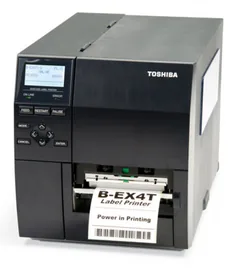
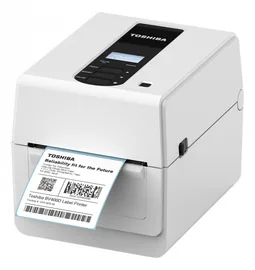
What the Toshiba TEC range looks like in the registry
| Model | Evidence | Resolution | Width | Command language | Connections | Driver needed |
|---|---|---|---|---|---|---|
| B-EX4T | Production-observed | 203 / 305 / 600 DPI | 104 mm | TPCL | USB, Ethernet, Wi-Fi (model-dependent) | No |
| BV400 | Production-observed | 203 DPI | 104 mm | TPCL | USB, Ethernet/Wi-Fi/Bluetooth (model-dependent) | No |
Not the Toshiba TEC model you own? The registry only lists models LabelInn has explicit evidence for, so it is deliberately shorter than the manufacturer catalogue. A model missing here often still prints, because compatibility follows the command language rather than the model name.
Reading a Toshiba TEC model number
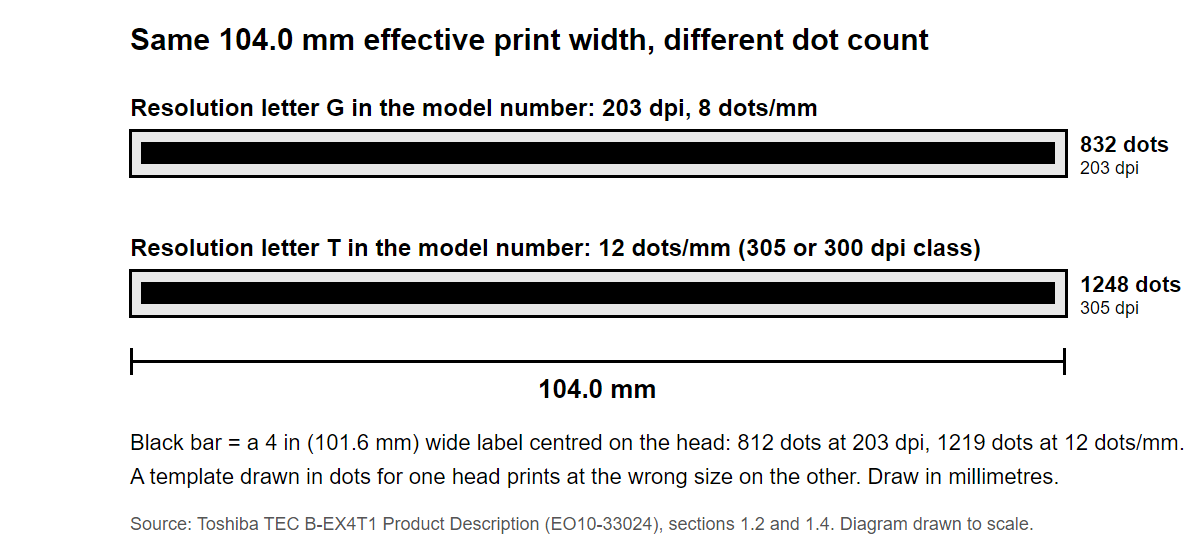
Toshiba's own product description for the B-EX4T1 decodes the model number B-EX4T1-GS12-QM-R. The digit after the T is the print-head type, not the resolution, and the resolution is a letter further along. Reading the resolution from the wrong place is the commonest way to get labels at the wrong size, so decode the whole number before you design.
| Position in B-EX4T1-GS12-QM-R | Meaning (Toshiba's key) |
|---|---|
| B-EX | Toshiba TEC EX series |
| 4 | Printing width: 4 inch (6 means 6 inch) |
| T or D | Printing method: T = thermal transfer and direct thermal, D = direct thermal only |
| 1 or 2 | Print head type and sensor position: 1 = near-edge head, sensor in the centre; 2 = flat head, sensor on the left |
| G, T or H | Resolution: G = 203 dpi, T = 305 or 300 dpi, H = 600 dpi |
| S, H or C | Issue mode: S = standard, H = peel-off, C = cutter |
| QM, CN or none | Destination: QM = global, CN = China, none = Japan |
Sources: Toshiba TEC B-EX4T1 Product Description EO10-33024 (PDF)
Models with evidence, and what to check on each
B-EX4T (industrial, 4 in)
Toshiba's data lists a 104.0 mm effective print width as 832 dots at 8 dots/mm on the 203 dpi head and as 1,248 dots at 12 dots/mm on the T-resolution head. USB 2.0 and wired LAN (10/100) are the standard interfaces to the PC. Read the resolution letter in the model number and confirm the dpi LabelInn shows for the printer before a production run. The model page is Toshiba B-EX4T.
BV400 (desktop, 4 in)
Toshiba's BV400D brochure lists 203 dpi (GS versions) and 300 dpi (TS versions), USB 2.0 and Ethernet 10/100 as standard, optional Wi-Fi and Bluetooth, and TPCL plus Basic Command Interpreter as native languages with ZPL II, DPL and SBPL emulation. LabelInn has no BV400-specific profile and falls back to a 203 dpi, 104 mm desktop envelope, so on a 300 dpi unit confirm the resolution on the printer card. The model page is Toshiba BV400.
Sources: Toshiba TEC BV410D / BV420D product brochure (PDF, Polish edition)
What LabelInn can and cannot do from software
Calibration happens at the printer
None of the Toshiba manuals LabelInn's TPCL support is built from (B-SA4T, B-415, BV400 and B-EX4) lists a host command that calibrates the gap sensor. On the BV400 the gap and black-mark thresholds are set at the front panel or with Toshiba's setting tool, and on a B-EX4 running in DPL emulation the calibration commands are explicitly not supported. LabelInn's calibrate action on a Toshiba is therefore a sensor-aligned feed that re-syncs to the top of the label, not a real calibration. Calibrate on the panel first, then print.
Emulation modes hide TPCL
A Toshiba configured for ZPL or DPL emulation still reports itself as Toshiba but will not accept native TPCL, so the job appears to be sent and nothing prints. Switch the printer back to its TPCL (native) mode.
What goes on the wire
A LabelInn job is built from [ESC]C (clear the buffer), [ESC]D (label size, in tenths of a millimetre), [ESC]SG (the label as a bitmap) and [ESC]XS (issue). For a 100 x 150 mm label with a 3 mm gap and one copy on a gap-sensor roll, the size and issue commands are [ESC]D1530,1000,1500 and [ESC]XS;I,0001,0002C4010, where the digit after the C is the print speed in in/s (4 by default). According to LabelInn's source notes the [ESC]D syntax was corrected against a physical Toshiba B-FV4, a model that is not yet one of the evidence-labelled pages here.
Set up a Toshiba with LabelInn
- Decode the model number with the table above and write down the resolution letter, the print width and the issue mode (standard, peel-off or cutter).
- Connect over USB 2.0 or Ethernet. Both are standard on the B-EX4T1 and the BV400D according to Toshiba's documents.
- Make sure the printer is in its native TPCL mode and not in a ZPL or DPL emulation mode.
- Load the media and set the sensor thresholds at the printer's front panel, because there is no software calibration. Print the printer's own test label.
- Add the printer in LabelInn and check the dpi it shows against your model number. Create the media definition at the real label size in millimetres.
- Print one label, check the size with a ruler, then run your batch from Excel or CSV.
Frequently asked questions
Which command languages do these Toshiba TEC models speak?
Across the Toshiba TEC models in this registry LabelInn has recorded TPCL. LabelInn prints by sending one of these directly, which is why a vendor driver is not always part of the path.
What does the evidence label on each model mean?
Production-observed means successful print jobs for that exact reported model appear in LabelInn telemetry. Protocol-compatible means the manufacturer documents a command language LabelInn supports, but the model has not been observed. Neither is a claim that a LabelInn engineer held the hardware.
Do these Toshiba TEC printers work on both Windows and macOS?
2 of the models here record Windows support and 2 record macOS support. Where direct command printing is available, macOS does not need a model-specific print driver.
Which Toshiba TEC printers does LabelInn support?
LabelInn prints to Toshiba TEC label printers that speak TPCL. Two models have evidence from real jobs and their own pages: the B-EX4T industrial printer and the BV400 desktop printer. LabelInn's TPCL engine also carries hardware profiles for other Toshiba families, but those carry no evidence label on this site.
Does LabelInn work with Toshiba TEC industrial printers such as the B-EX4T?
Yes, in TPCL. The B-EX4T appears in LabelInn production telemetry with 486 recorded jobs. The connection, firmware and suffix were not captured, and the LabelInn team has not tested one on its own bench.
Is there a Toshiba TEC colour label printer in LabelInn?
Not in this registry. The two Toshiba TEC models listed are monochrome thermal printers. LabelInn's colour label evidence is for Epson ColorWorks.
Do I need a Toshiba driver?
No. LabelInn builds the TPCL data itself and sends it over USB or the network. Toshiba's driver and setting tools remain useful for panel and network configuration.
Can LabelInn calibrate my Toshiba from the software?
Not in the way a Zebra can be. None of the Toshiba manuals LabelInn is built from lists a TPCL command that calibrates the gap sensor; Toshiba sets sensor thresholds at the front panel or with its own setting tool. LabelInn can send a sensor-aligned feed, which re-syncs to the top of the label but does not recalibrate.
Why does my Toshiba accept the job but print nothing?
The most common cause is a printer set to a ZPL or DPL emulation mode, which will not accept native TPCL. Switch it back to TPCL. The next most common cause is a sensor or media mismatch, which the printer's own test label will show.