Zebra ZD220: setup, calibration and label software for Mac and Windows
The ZD220 is the USB-only value model in Zebra's ZD200 family, sold as a direct-thermal ZD220d and a thermal-transfer ZD220t. Its specification lists ZPL II and EPL2, 203 dpi and a 104 mm print width, but no Ethernet or Wi-Fi, so it is set up as a USB printer only.
Specifications and steps reviewed 17 October 2026.
Official manufacturer documentation shows a native or emulated command language supported by LabelInn. This exact model has not been physically tested or observed in production.
Zebra's official ZD220 specification documents native ZPL II/EPL2, 203 DPI, 104 mm print width, and USB 2.0. LabelInn has not physically tested or production-observed this exact registry record.
What LabelInn supports
entry-level 4-inch shipping, retail, ticket and asset labels over USB. The ZD220 is the USB-only value model in Zebra's ZD200 family, sold as a direct-thermal ZD220d and a thermal-transfer ZD220t. Its specification lists ZPL II and EPL2, 203 dpi and a 104 mm print width, but no Ethernet or Wi-Fi, so it is set up as a USB printer only.
ZPL II (native), EPL2 (native) output at the selected resolution.
Direct command printing is supported when an available interface is selected.
Select 203 DPI and ZPL II, confirm whether the unit is direct thermal or thermal transfer, and connect through USB. A vendor driver can help with diagnostics, but LabelInn's documented protocol path does not depend on it.
ZD220 at a glance
The ZD220 is the USB-only entry model of Zebra's ZD200 desktop family. Zebra's data sheet lists ZPL II and EPL2, a 203 dpi head with a 4.09 in (104 mm) print width, and USB 2.0 as the only interface. There is no Ethernet, Wi-Fi or Bluetooth to configure, so there is nothing to discover on the network: the printer shows up as a USB device.
What we can and cannot say: LabelInn has no recorded ZD220 job in its production telemetry and nobody on the LabelInn team has run one on a physical ZD220. This page therefore gives you Zebra's own specification, the calibration steps from Zebra's quick start guide, and the exact ZPL settings LabelInn writes for a printer of this class. The compatibility claim rests on ZPL II, which LabelInn sends directly to the other Zebra models it has seen in production.
Zebra's published specification
Variants
ZD220d (direct thermal) and ZD220t (thermal transfer). An optional peeler is factory-installed.
Resolution
203 dpi (8 dots/mm), dot pitch 0.0049 in (0.13 mm)
Maximum print width
4.09 in (104 mm), which is 832 dots at 8 dots/mm
Media width
1.00 to 4.40 in (25.4 to 112 mm)
Label length
1.0 in (25.4 mm) minimum, 39 in (991 mm) maximum
Media thickness
0.003 to 0.0075 in (0.08 to 0.19 mm)
Roll
Up to 5 in (127 mm) outside diameter. 0.5 in and 1 in cores as standard; optional adapters for 1.5, 2 and 3 in cores.
Media sensing
Gap, black line and notch. The black-mark sensor is movable (limited range, centre to left); the gap sensor is fixed and off-centre.
Print speed
4 in/s (102 mm/s)
Command languages
ZPL II and EPL2 (EPL1 line mode on the ZD220d)
Interface
USB 2.0 full speed, Type B. No other interface is listed.
Ribbon (ZD220t only)
74 m (244 ft) rolls, 1.33 to 4.3 in (33.8 to 109.2 mm) wide, 0.5 in core
Connect the power supply and the USB cable. Open the cover, seat the roll on the holder, push the media under the guides and leave the sensor near the centre, which Zebra's quick start guide gives as the default position.
Press and release the power button. The printer is ready when the status light is steady green.
Calibrate the media: press and hold FEED until the status light blinks off and on twice, then release. Do this once now and again every time you change to a different label stock.
Print the configuration report: press and hold FEED until the status light blinks once, then release. Check that it reports 203 dpi and a media type that matches your roll (gap/web for die-cut labels, continuous for receipt stock).
Open LabelInn on Windows or Mac and add the ZD220 as a USB printer. If Zebra's driver is installed, Windows names the queue something like "ZDesigner ZD220-203dpi ZPL" and LabelInn reads the 203 dpi out of that name; without a dpi in the name LabelInn assumes 203, which is correct for this model.
Create a media definition at your real label size. Set Print Method to Direct Thermal (ZD220d) or Thermal Transfer (ZD220t), and Feed Mode to match the stock: gap, black mark or continuous.
Print one test label, check the size against a ruler, then raise or lower Darkness one or two steps at a time before you run a batch from Excel or CSV.
Settings that matter on this model
Direct thermal or thermal transfer
The ZD220d has no ribbon; the ZD220t does. Pick the matching Print Method in the media definition and LabelInn writes ^MTD or ^MTT. A direct-thermal Zebra permanently reports its ribbon sensor as empty, so LabelInn does not raise a ribbon fault from that alone; it only treats ribbon-out as a problem when the printer is also in an error, paused or offline state.
Sensor type has to match the stock
The Feed Mode in the media definition becomes ^MNY for gap or web, ^MNM for black mark and ^MNN for continuous. A gap setting on black-mark or continuous stock is the usual reason for blank labels between prints; calibrate again after any change of stock. For black-mark rolls slide the movable sensor under the mark; for die-cut labels keep it near the centre as Zebra's guide shows. The fix guide in Zebra ZD220 printing blank labels or skipping covers the symptoms in detail.
The 832-dot ceiling
LabelInn converts the label width in millimetres to dots at 203 dpi and writes it as ^PW. A 100 mm label becomes ^PW799. Zebra accepts media up to 112 mm but the head only prints 104 mm (832 dots), so artwork wider than that is cut off at the edge, not shrunk.
Speed and darkness
Zebra rates the ZD220 at 4 in/s. LabelInn's built-in thermal presets write ^PR6 and ^MD15, so set Print Speed to 4 or lower yourself. Darkness runs from 0 to 30; start at the preset 15 and move in steps of two or three, because a dark setting thickens the bars of a small Code 128 until the gaps close.
USB only, so ignore the ZD230 network steps
Instructions written for the ZD230 (which can have Ethernet or Wi-Fi) do not apply here. A ZD220 cannot be added by IP address; if it does not appear, check the cable and the status light, not the network.
Mac
LabelInn sends ZPL to USB printers on macOS without a vendor print driver where the operating system exposes the device, but our compatibility record marks macOS for this exact model as conditional because no ZD220 run on a Mac has been recorded. Print one label before you commit to a production batch. Zebra's own drivers and utilities are on Zebra's ZD220 support page; LabelInn does not need them to print.
A sample label at the ZD220's real size
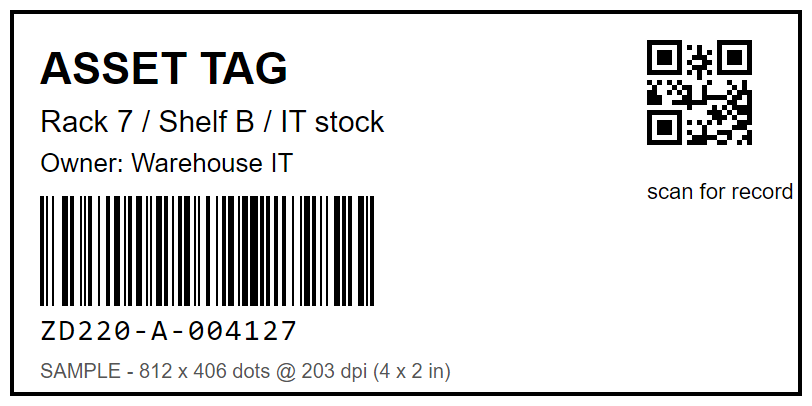
This is a 4 x 2 in (101.6 x 50.8 mm) asset label drawn in printer dots: 812 x 406 pixels at 203 dpi, with a Code 128 barcode at a 2-dot module (0.25 mm) and a QR code at a 5-dot module. The width is 20 dots inside the 832-dot head.
Sample label, 812 x 406 dots = 4 x 2 in at 203 dpi. Drawn for this page, not a photograph of a printed label.
Media preamble LabelInn writes before the label for this size (direct thermal, gap, darkness 15, speed 4)
^PW812^LL406^MD15^PR4^MTD^MMT^MNY^LS0
Operating-system notes
Windows Supported
Use either the operating-system print path or direct protocol output when this record marks direct printing as supported.
macOS Conditional
Direct protocol output avoids a model-specific print driver when the selected connection is available to macOS.
Android Conditional
Android support is conditional on a supported USB, Bluetooth, or network path; the production observation did not record which path was used.
Common configuration problems
ZD230 network instructions are often applied incorrectly to the USB-only ZD220.
A 300 DPI template changes physical size when sent to the fixed 203 DPI printhead.
Official manufacturer documentation shows a native or emulated command language supported by LabelInn. This exact model has not been physically tested or observed in production. Protocol compatibility is not an exact-hardware test. Confirm that the documented emulation is enabled on the purchased SKU before production use.
Does Zebra ZD220 require a driver?
Not for LabelInn's direct command path when a supported interface is available. A vendor driver may still be useful for configuration and diagnostics.
Does the Zebra ZD220 work on a Mac?
The ZD220 speaks ZPL II over USB and LabelInn can send ZPL straight to a USB printer on macOS, so Zebra's Windows ZDesigner driver is not required. We have not recorded a ZD220 job on a Mac, so treat macOS as conditional and print one test label first.
Is the Zebra ZD220 USB only?
Yes. Zebra's data sheet lists USB 2.0 (Type B) as the only interface. Ethernet and Wi-Fi belong to other models of the family such as the ZD230, so the ZD220 cannot be added by IP address.
How do I calibrate a Zebra ZD220?
With media loaded and the status light steady green, press and hold FEED until the status light blinks off and on twice, then release. The printer measures the roll. Holding FEED for a single blink instead prints the configuration report. These steps come from Zebra's ZD220/ZD230 quick start guide.
What is the maximum label width of the ZD220?
Zebra lists media from 1.00 to 4.40 in (25.4 to 112 mm) but a maximum print width of 4.09 in (104 mm), which is 832 dots at 203 dpi. Anything wider than 104 mm is cut off.
What is the difference between the ZD220d and the ZD220t?
The ZD220d prints directly on heat-sensitive labels. The ZD220t also takes a thermal-transfer ribbon, 74 m long and up to 109.2 mm wide, so it can print on ordinary stock. Set the matching Print Method in LabelInn so it sends ^MTD or ^MTT.