Zebra ZD410: driver, setup and label software for Mac and Windows
The narrow ZD410 is not a 4-inch shipping printer. Its 56 mm print width and optional 300 DPI configuration suit small labels where barcode density and precise text matter.
Specifications and steps reviewed 17 October 2026.
Successful jobs for this exact reported model exist in LabelInn production telemetry. The connection, firmware, LabelInn version, and date were not captured unless stated below.
Production telemetry contains successful print jobs reported as Zebra ZD410; resolution and connection were not captured.
What LabelInn supports
compact 2-inch healthcare, jewelry, shelf, and asset labels. The narrow ZD410 is not a 4-inch shipping printer. Its 56 mm print width and optional 300 DPI configuration suit small labels where barcode density and precise text matter.
ZPL II (native), EPL2 (native) output at the selected resolution.
Direct command printing is supported when an available interface is selected.
Select the unit's actual 203 or 300 DPI resolution before designing. Keep label width at or below 56 mm and verify the installed wired or wireless option.
ZD410 at a glance
The ZD410 is Zebra's compact 2 in desktop printer. Zebra's user guide gives a maximum print width of 56 mm (2.20 in) on the 203 dpi version and 54 mm (2.12 in) on the 300 dpi version, so the extra resolution costs a little width. It handles media from 15 to 60 mm wide, which suits healthcare, jewellery, shelf-edge and small asset labels, and it is not a 4 in shipping printer.
LabelInn's production telemetry contains successful jobs reported as Zebra ZD410. The connection, resolution and firmware were not captured, and the team has not run a ZD410 on its own bench. The specification figures below come from Zebra's user guide; the settings section describes what LabelInn writes.
Zebra's published specification
Resolution
203 dpi (0.125 mm dot pitch) or 300 dpi (0.085 mm dot pitch), depending on the version
Maximum print width
56 mm (2.20 in) at 203 dpi; 54 mm (2.12 in) at 300 dpi. That is 448 dots at 203 dpi and about 638 dots at 300 dpi.
Media width
15 mm (0.585 in) minimum, 60 mm (2.36 in) maximum
Label length
990 mm (39 in) maximum. Minimum 6.35 mm (0.25 in) for tear-off, 12.7 mm (0.5 in) with the peel dispenser, 25.4 mm (1.0 in) with the cutter.
Media thickness
0.08 mm (0.003 in) to 0.1905 mm (0.0075 in)
Roll
Up to 127 mm (5 in) outside diameter. Cores 12.7 mm and 25.4 mm as standard; 38.1, 50.8 and 76.2 mm with the optional roll adapter.
Media tracking
Web media (gaps, holes or notches), black mark and perforated media. For continuous rolls Zebra says to use the transmissive (gap) sensor so the printer can detect the end of the roll.
Command languages
ZPL II and EPL2
Interfaces
USB on every unit; Ethernet, Wi-Fi and Bluetooth depend on the variant you bought
Connect power and USB, then load the roll following the Roll Media Sensing and Media Loading section of Zebra's ZD410 user guide.
Find out which version you have, 203 or 300 dpi. It changes your label size in dots, your barcode module size and the maximum print width.
Run SmartCal: with the media loaded, the cover closed and the printer on, press and hold PAUSE and CANCEL together for two seconds, then release. The printer feeds media, measures several labels and returns to Ready. SmartCal detects whether the roll is gap, black line or notch media and measures its length.
If SmartCal does not recognise the stock, follow the Manually Calibrating Media procedure in the same user guide.
Open LabelInn and add the ZD410 as a USB printer. If Zebra's driver is installed Windows names the queue like "ZDesigner ZD410-300dpi ZPL" and LabelInn reads the number from the name; with no number in the name it assumes 203 dpi, so check the printer card on a 300 dpi unit.
Create the media definition at the real label size, no wider than 56 mm (203 dpi) or 54 mm (300 dpi). Set Print Method to match the unit and Feed Mode to match the roll.
Print one label, check the barcode with a scanner, then run your batch.
Settings that matter on this model
Two resolutions, two label sizes in dots
The same 2 x 1 in (50.8 x 25.4 mm) label is 406 x 203 dots on a 203 dpi ZD410 and 600 x 300 dots on a 300 dpi one. LabelInn works in millimetres and converts with the resolution it believes the printer has, so a 300 dpi unit that LabelInn thinks is 203 dpi prints a label that is one third too large. Use the resolution shown on the printer card.
A 4 in template is cut off
The head is 2 in wide. A 100 mm design sent to a ZD410 is clipped at 56 mm, not scaled. Make the media definition the size of the roll in the printer.
Narrow stock and the sensor
Zebra's minimum media width is 15 mm and its minimum label length is 6.35 mm for tear-off. LabelInn writes the media tracking you choose as ^MNY (gap), ^MNM (black mark) or ^MNN (continuous). Run SmartCal again whenever the stock changes. ZD410 not printing or skipping labels covers the checks.
Barcode module size
At 300 dpi a 2-dot module is 0.17 mm, at 203 dpi it is 0.25 mm. Small labels with long Code 128 values are usually better with a Data Matrix or QR code, which pack the same data into a smaller square.
Wireless options
USB is the baseline on every unit. Whether yours also has Ethernet, Wi-Fi or Bluetooth is a property of the exact variant, which is why LabelInn lists them as depending on the variant. Confirm on the configuration report or the box before you plan a wireless installation.
A sample label at the ZD410's real size
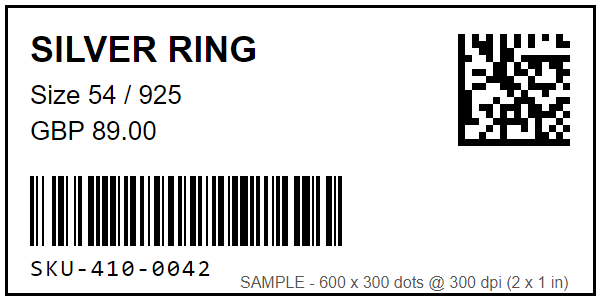
A 2 x 1 in (50.8 x 25.4 mm) jewellery label drawn in printer dots: 600 x 300 pixels at 300 dpi, with a Data Matrix at a 7-dot module and a Code 128 at a 2-dot module. It is 38 dots inside the 638-dot width of the 300 dpi head.
Sample label, 600 x 300 dots = 2 x 1 in at 300 dpi. Drawn for this page; the item and price are made up.
Media preamble LabelInn writes before the label for this size (direct thermal, gap, darkness 15, speed 4)
^PW600^LL300^MD15^PR4^MTD^MMT^MNY^LS0
Operating-system notes
Windows Supported
Use either the operating-system print path or direct protocol output when this record marks direct printing as supported.
macOS Supported
Direct protocol output avoids a model-specific print driver when the selected connection is available to macOS.
Android Conditional
Android support is conditional on a supported USB, Bluetooth, or network path; the production observation did not record which path was used.
Common configuration problems
A 4-inch template is clipped because the mechanism is only 2 inches wide.
Using the wrong DPI changes barcode module size and text placement.
Successful jobs for this exact reported model exist in LabelInn production telemetry. The connection, firmware, LabelInn version, and date were not captured unless stated below. Production-observed does not mean physically tested by the LabelInn team. Confirm the exact suffix, installed options, command mode, DPI, and media.
Does Zebra ZD410 require a driver?
Not for LabelInn's direct command path when a supported interface is available. A vendor driver may still be useful for configuration and diagnostics.
Where do I download the Zebra ZD410 driver?
Zebra publishes drivers, Zebra Setup Utilities and firmware on its ZD410 support page (zebra.com/us/en/support-downloads/printers/desktop/zd410.html). LabelInn does not need Zebra's driver to print: it sends ZPL II directly. The driver is only useful if you also print from other Windows programs.
What software works with the Zebra ZD410?
Zebra's own tools are ZebraDesigner and Zebra Setup Utilities. LabelInn is an alternative that designs labels, binds Excel or CSV data and sends ZPL directly over USB, on Windows and Mac.
How wide can a ZD410 label be?
Zebra lists media from 15 to 60 mm wide and a maximum print width of 56 mm (203 dpi) or 54 mm (300 dpi). A 4 in label does not fit; the ZD410 is a 2 in printer.
How do I calibrate a Zebra ZD410?
Load the media, close the cover, power on, then press and hold PAUSE and CANCEL together for two seconds and release. SmartCal feeds media, detects gap, black line or notch sensing and measures the label length. If it fails, use the manual calibration procedure in Zebra's user guide.
Is the ZD410 203 or 300 dpi?
Both versions exist. Zebra lists 203 dpi (0.125 mm dot pitch) and 300 dpi (0.085 mm dot pitch). Check yours; the resolution decides your label size in dots and the maximum print width.