H-codes (hazard statements) — drive which GHS hazard pictograms are shown and which standardised hazard text appears, in every selected language.
JUNE 8, 2026 / COMPLIANCE / UPDATED OCTOBER 17, 2026
GHS / CLP Label Software: Chemical Hazard Label Maker
GHS and CLP label software: H and P codes in, hazard label out. Pictograms, one signal word, Annex I sizes, 24 EU languages plus Turkish. Worked example.
FREE PLAN · NO CREDIT CARD · WINDOWS / MAC / ANDROID / WEB
FREE · NO INSTALLMake a GHS label in your browserStart from the chemical template: official pictograms at the CLP minimum size, signal word, H and P statements. Edit it and print or download a PDF.
Native printer languagesZPL, TSPL, TPCL, ESC/Label
No driver to installUSB, network or Bluetooth
Every platformWindows, macOS, Android, web
Free to startNo credit card, 14-day Pro trial
THE PROBLEM
Building a chemical hazard label by hand is slow and error-prone: pick the right pictograms, work out which signal word wins, get every hazard and precautionary statement translated correctly, and then size the whole thing to the package. LabelInn's GHS / CLP label engine does the heavy lifting from structured data.
You give it the inputs — H-codes, P-codes, container size and target languages — and it resolves a draft CLP hazard label: the GHS pictograms your H-codes call for (with the Article 26 precedence rules applied), a single signal word under Article 20(3), the Annex I minimum sizes for the package, standardised statement text in 24 EU languages plus Turkish, and the Annex VIII UFI when you need one.
From hazard data to draft label. H-codes + P-codes + container size + languages → a CLP-structured hazard label for your competent person to verify. Start free →
WORKED EXAMPLE
A 1 litre bottle of solvent cleaner, from H-codes to label
Input: H225, H319, H336 and a 1 litre container. Result: flame and exclamation-mark pictograms, the signal word Danger, three hazard statements, six precautionary statements and a supplier block.
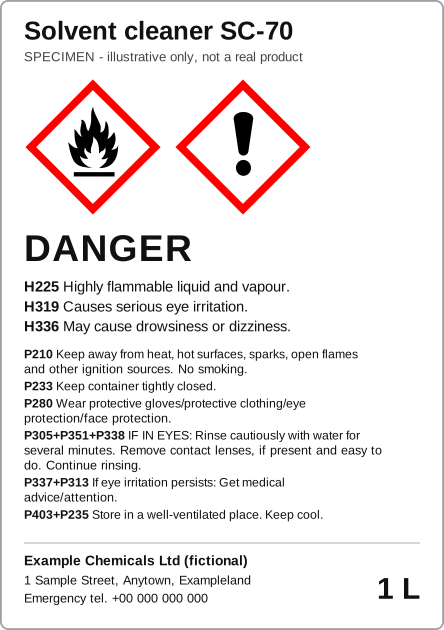
The codes below are the ones a flammable, eye-irritating, drowsiness-causing solvent such as an alcohol-based cleaner would carry. The product is fictional, and choosing the codes is a classification decision that stays with you. What the engine does with them is mechanical, so you can check every step.
| Input | What follows | Rule |
|---|---|---|
| H225, Highly flammable liquid and vapour | Flame pictogram GHS02; signal word Danger | Article 19, Article 20 |
| H319, H336 | Exclamation-mark pictogram GHS07; signal word Warning | Article 19, Article 20 |
| Danger and Warning both resolved | Only "Danger" is printed | Article 20(3) |
| No GHS05, GHS06 or GHS08 present | GHS07 stays: nothing supersedes it | Article 26(1)(b) to (d) |
| 1 litre, so "not exceeding 3 litres" | Minimum label 52 × 74 mm if possible; pictograms at least 10 × 10 mm, if possible 16 × 16 mm | Annex I, Table 1.3 |
| Label drawn at 74 × 105 mm | 7,770 mm² ÷ 15 = 518 mm², so a pictogram side of at least 22.8 mm; drawn at 23 mm | Annex I, 1.2.1.3 |
| Six P-codes chosen: P210, P233, P280, P305+P351+P338, P337+P313, P403+P235 | Standard English text inserted for each; six is the ceiling unless the hazards need more | Article 22, Article 28(3) |
Everything else on the label comes from you and is not derived: the product identifier (Article 18), the supplier's name, address and telephone number and the nominal quantity (Article 17(1)(a) and (b)). A real label for a mixture may also need supplemental information (Article 25) and a UFI. Setting the type at a legible size for your package is also your check: the sample's small type is for illustration and is not claimed to meet the legibility rules.
Open the chemical template in your browser and rebuild this label, or start free to run it from your own H and P codes.
HOW IT WORKS
Three screens from data to printed label.
No copy-paste, no hunting for templates. The same flow repeats for every record.
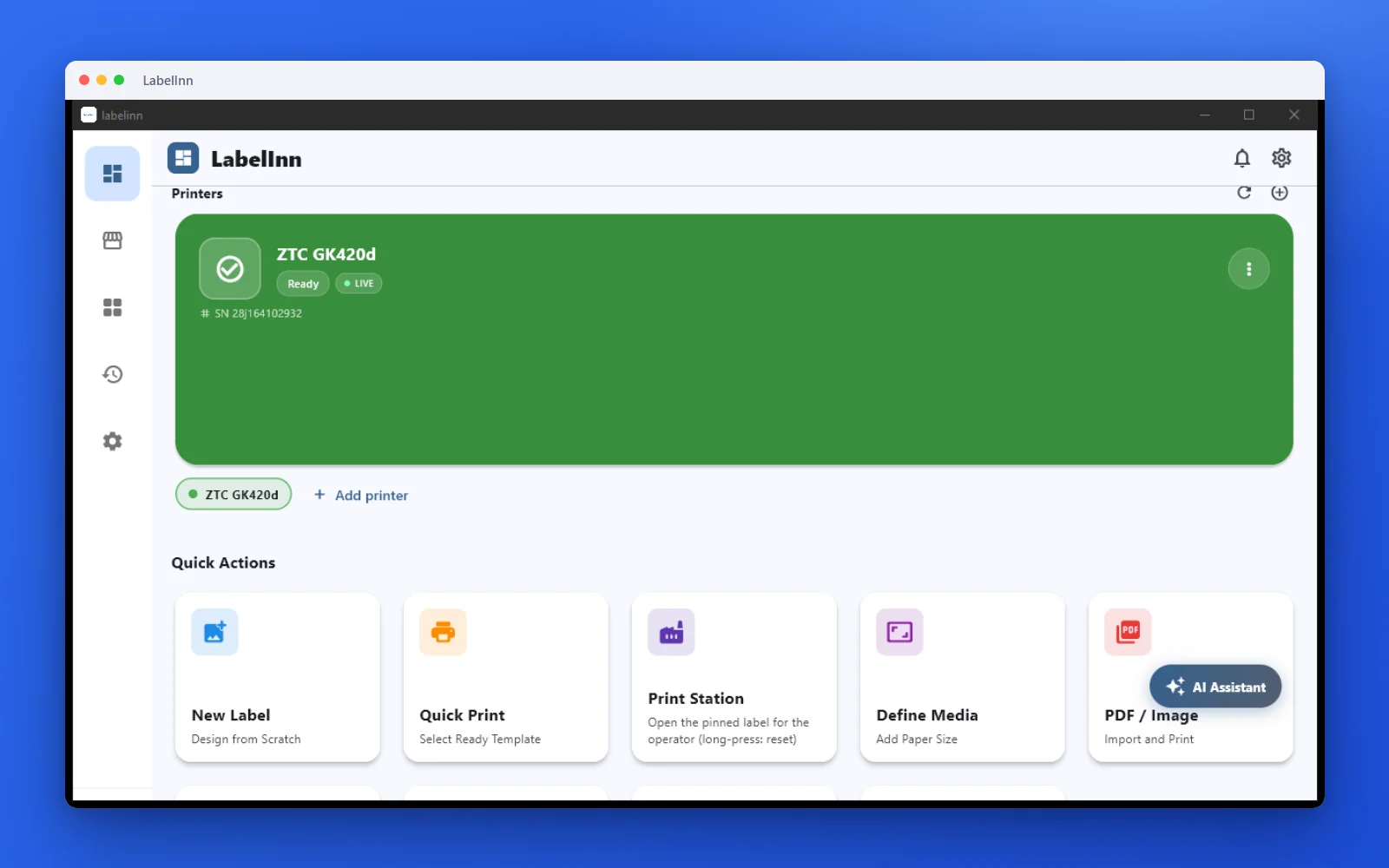
Printer status, quick actions and recent work in one place.
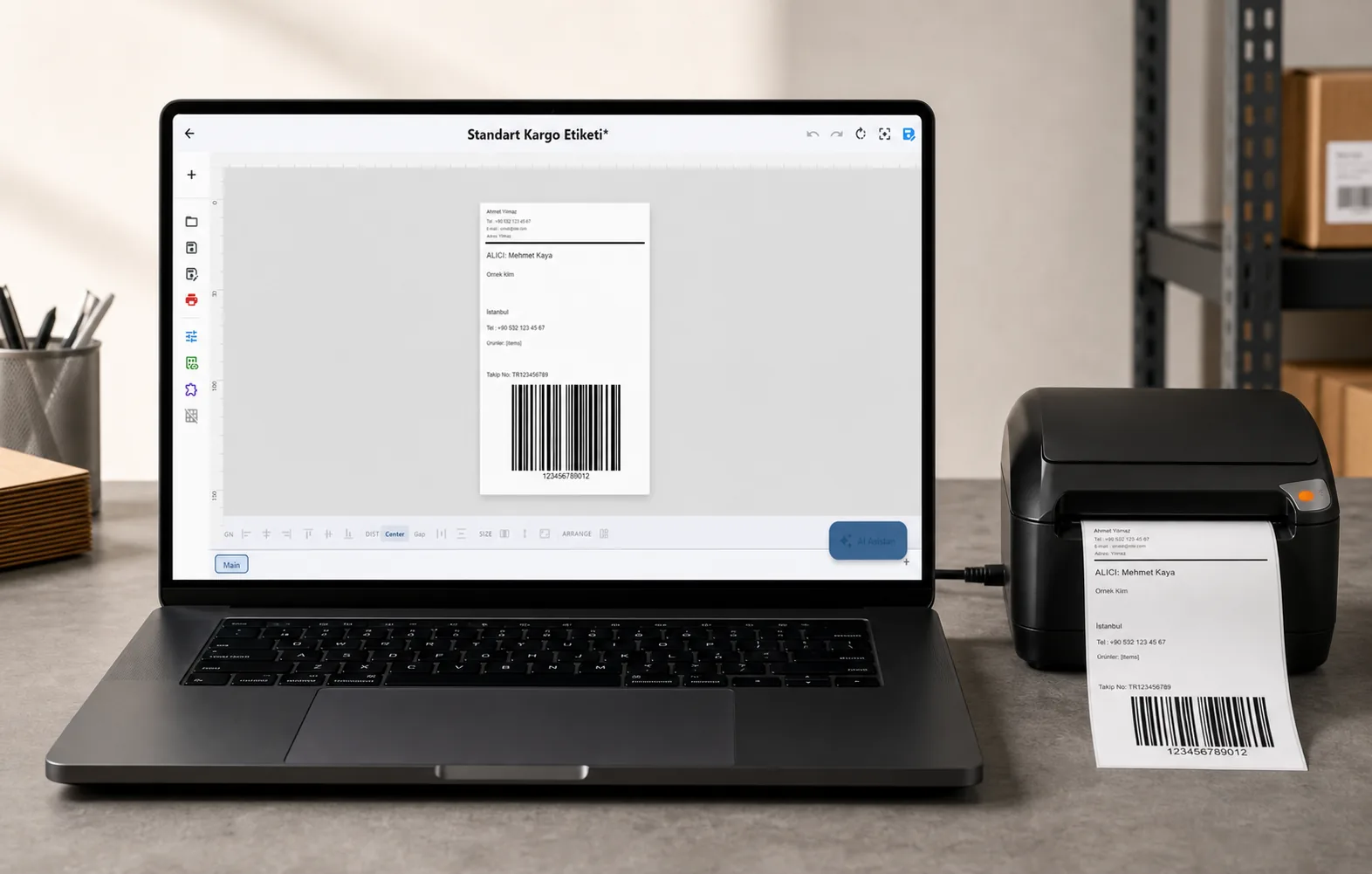
Text, barcodes, QR and images placed on the real media size.

See the label, the printer state and the copy count before it prints.
01
From Hazard Data to a Drafted Label
Instead of dragging boxes around a canvas, you describe the chemical's hazard profile and let the engine assemble it. Here is what each input drives:
P-codes (precautionary statements) — pull in the standardised prevention, response, storage and disposal text. You choose the set; the engine lays out the wording.
Container / package size — maps to the CLP Annex I minimum label and pictogram dimensions for that capacity band.
Target languages — render the H- and P-statement text in 25+ EU / EEA languages for products sold across multiple markets.
THE PROBLEM, THEN THE FIX
Why do hand-placed hazard pictograms end up inconsistent?
Pictograms pasted in as images drift from the required size, get squeezed to fit, and are easy to mix up between products.
The problemPictograms pasted in as images are resized by eye and swapped by hand.
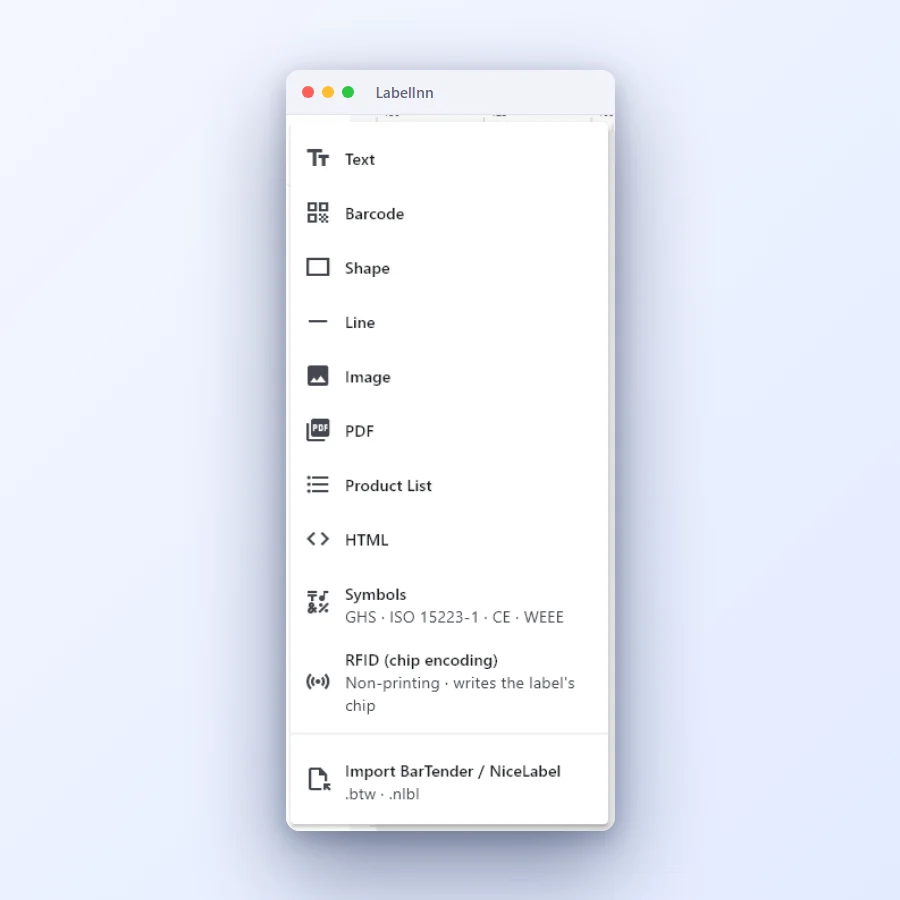 1Add what the label needsText, barcode, shape, line, image, PDF, product list, HTML, symbols and RFID are one click away.
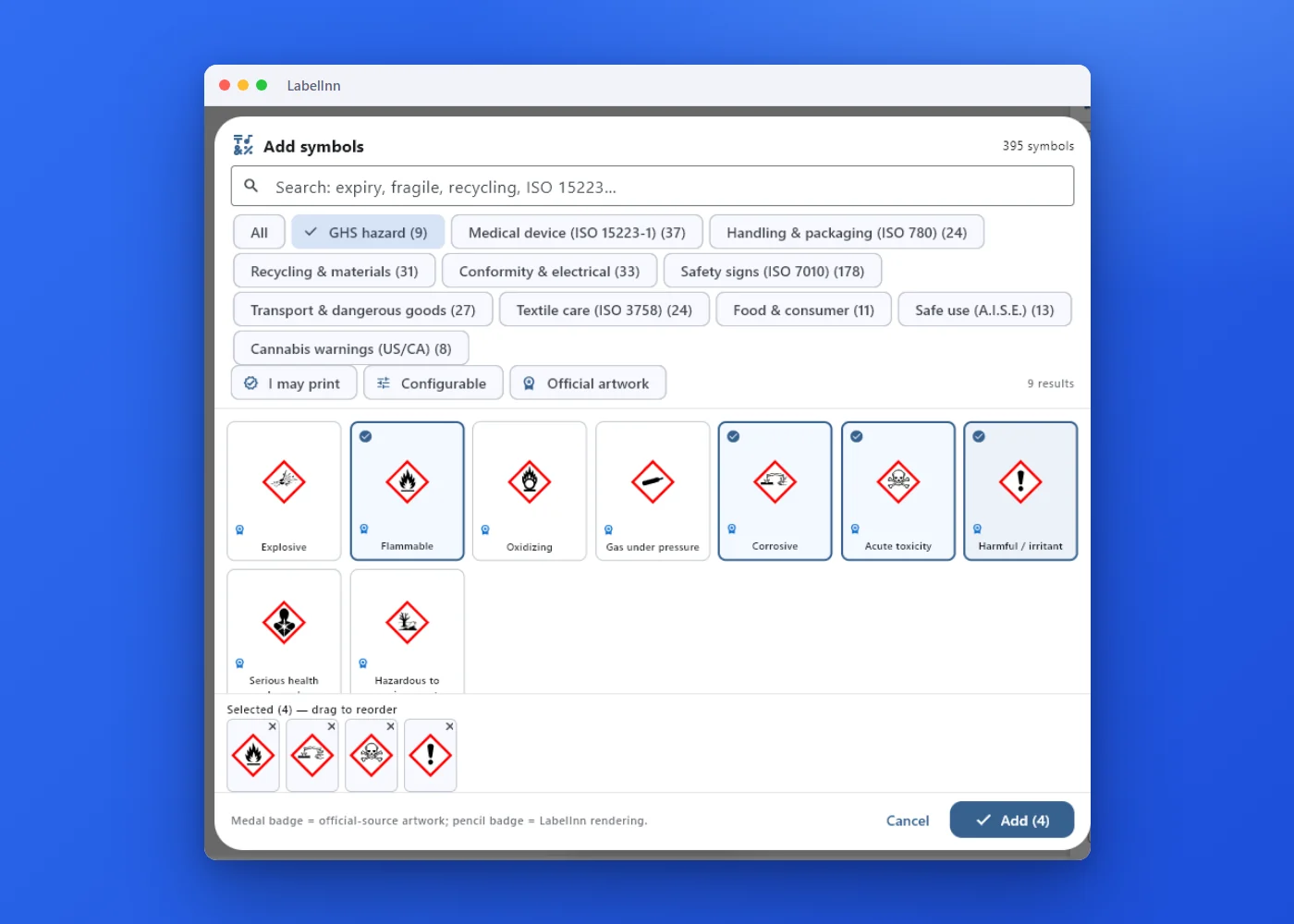 2Tick the pictograms you needFilter to GHS hazard, tick flammable, corrosive, toxic or harmful, then add them in one go.
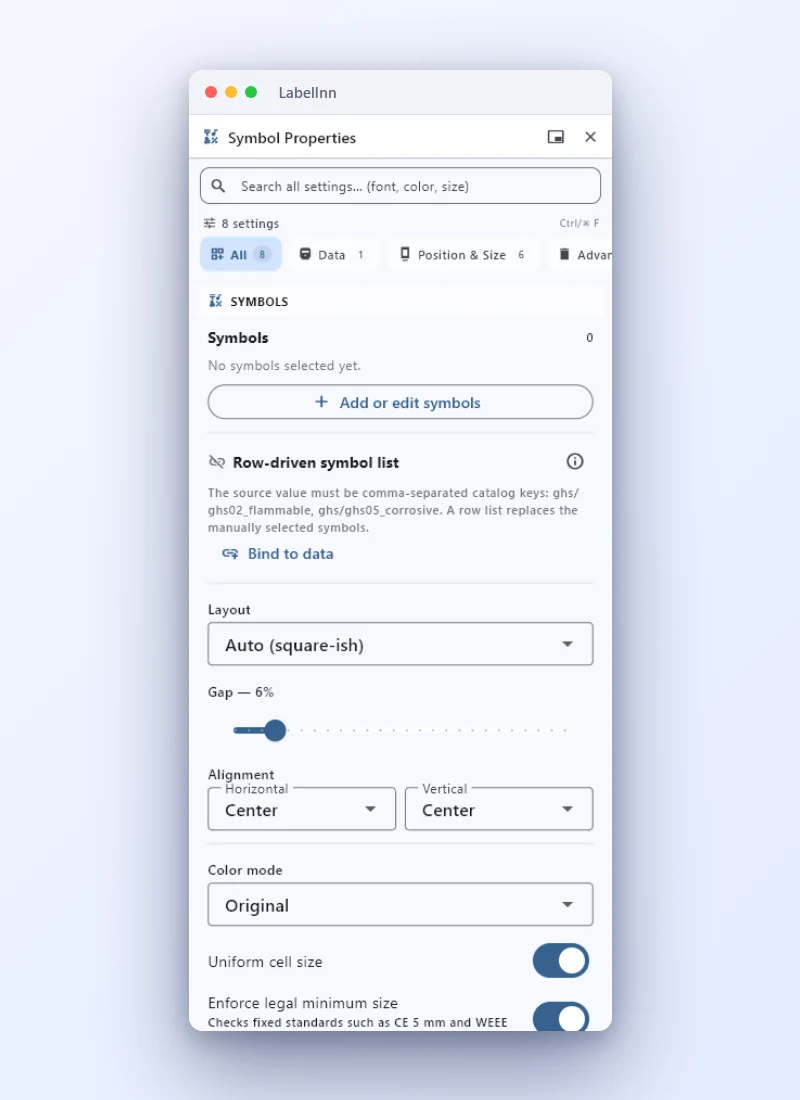 3Control layout and size rulesRow, column or grid, uniform cell size and a legal minimum-size check.
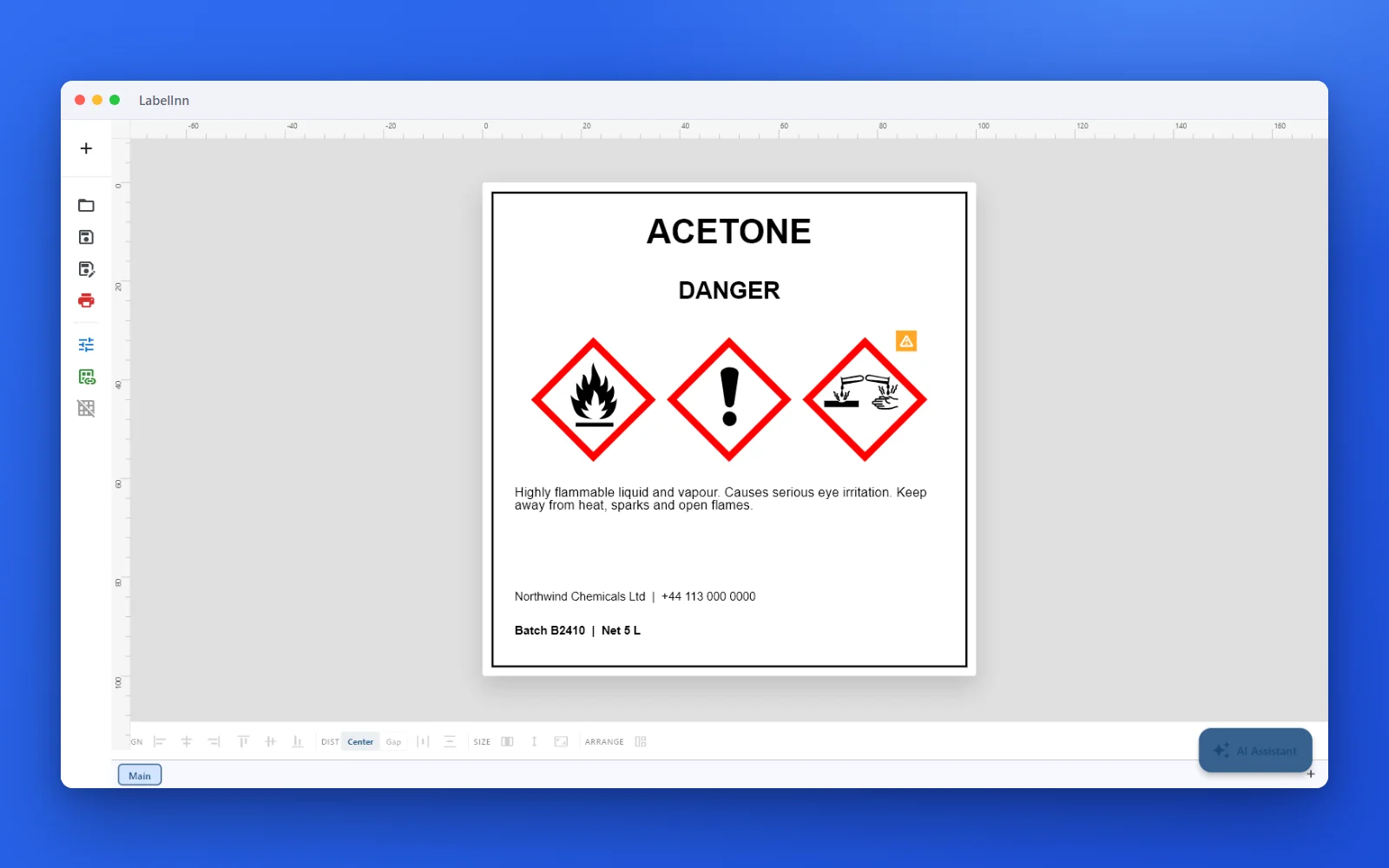 4A finished hazard labelProduct name, signal word, pictograms, statements and supplier details on a 100 x 100 mm label.
The fixThe pictograms are one native element with a minimum-size check for standards that fix one, so the label stays consistent.Get LabelInn free
02
What the Engine Resolves For You
| Step | What LabelInn does | What stays with you |
|---|---|---|
| GHS pictograms | Places the red-bordered diamond pictograms your H-codes trigger, then applies the Article 26 precedence rules (for example GHS06 removes GHS07) | Confirm the classification that produced those H-codes |
| Signal word | Applies CLP Article 20(3) — when "Danger" applies, "Warning" is suppressed | Verify the underlying hazard classification |
| Label & pictogram size | Sizes to the Annex I minimum for the container capacity | Confirm dimensions against the current regulation |
| Hazard & precautionary text | Inserts standardised H/P statement text in 24 EU languages plus Turkish | Approve translations & any supplier-specific wording |
| UFI (Annex VIII) | Generates the Unique Formula Identifier and places it on the label | File the poison-centre notification; verify inputs |
| Supplier block & layout | Assembles the label artwork ready to print on your label printer | Final review & sign-off by a competent person |
03
Article 20(3) and Article 26: One Signal Word, Fewer Pictograms
Two different articles do two different jobs, and they are often mixed up. Article 20(3) is the signal-word rule: where "Danger" is used on the label, "Warning" shall not appear. Article 26 is the pictogram precedence rule: it removes or makes optional pictograms that a stronger one already covers. For example, GHS06 (skull and crossbones) means GHS07 (exclamation mark) shall not appear, and GHS05 (corrosion) removes GHS07 for skin or eye irritation. GHS02 or GHS06 makes GHS04 optional.
LabelInn applies both from the codes you supply. The exclamation-mark pictogram is removed only when the pictogram that supersedes it is present and the exclamation mark would be there for the covered reasons, so a product that is both corrosive and a skin sensitiser keeps GHS07. Pictograms that become optional are listed for you to decide rather than dropped silently. Your competent person still verifies the classification the codes came from.
04
Annex I Sizing, Tied to Your Container
CLP Annex I sets minimum label dimensions and minimum pictogram dimensions by package capacity. Enter the container size and LabelInn maps it to the right band. The numbers, as they read in Annex I section 1.2.1.4 (Table 1.3), are in the table below; section 1.2.1.3 adds that each pictogram covers at least one fifteenth of the label's minimum area for the Article 17 information, and never less than 1 cm².
| Capacity of the package | Label (mm) | Each pictogram (mm) |
|---|---|---|
| Not exceeding 3 litres | If possible, at least 52 × 74 | Not smaller than 10 × 10; if possible at least 16 × 16 |
| Over 3 litres, up to 50 litres | At least 74 × 105 | At least 23 × 23 |
| Over 50 litres, up to 500 litres | At least 105 × 148 | At least 32 × 32 |
| Over 500 litres | At least 148 × 210 | At least 46 × 46 |
The pictogram column is the one-fifteenth rule rounded: the square root of (52 × 74) ÷ 15 is 16.0 mm, of (74 × 105) ÷ 15 is 22.8 mm, of (105 × 148) ÷ 15 is 32.2 mm and of (148 × 210) ÷ 15 is 45.5 mm. That has a consequence people miss: the minimum depends on the label, not only on the bottle. If you print a 74 × 105 mm label on a 1 litre bottle, the table's 16 mm applies to the minimum label, but LabelInn's size check works from the label you actually designed and asks for 22.8 mm. That is the stricter reading, and it is why the editor outlines a pictogram grid in red when its cells are smaller than the check allows. Where the package is too small or oddly shaped for a label, Article 29 and Annex I section 1.5 allow fold-out labels, tags or reduced content; LabelInn does not apply those exemptions for you.
Source: Regulation (EC) No 1272/2008, Annex I section 1.2.1. Checked on 17 October 2026 against the consolidated text published on legislation.gov.uk (the retained EU text; the Table 1.3 numbers are the same in the EU version) because EUR-Lex blocks automated reads. Regulation (EU) 2024/2865 has since amended Annex I with legibility rules (minimum character height and line spacing, with staged application dates). Read the current EU text and the application dates for your product before you finalise a layout; LabelInn does not check those rules.
CHECKLIST
What a CLP label must carry, and who supplies each element
Article 17(1) lists the label elements. This table shows where each one comes from when you use LabelInn.
| Label element | CLP reference | Where it comes from in LabelInn |
|---|---|---|
| Supplier name, address, telephone | Article 17(1)(a) | You type it once in the supplier block; it is placed on every label. |
| Nominal quantity (products sold to the public) | Article 17(1)(b) | You supply it. The container size also selects the Annex I size band. |
| Product identifier | Article 18 | You supply it. Names for mixtures and substances come from your safety data sheet. |
| Hazard pictograms | Article 19, Article 26, Annex V | Derived from your H-codes, then Article 26 precedence applied. Optional pictograms are listed, not dropped. |
| Signal word | Article 20 | Derived from the H-codes; "Danger" replaces "Warning". If no code carries a signal word the label is flagged not ready to print. |
| Hazard statements | Article 21, Annex III | Standard text for each H-code and EUH code, in the languages you pick. |
| Precautionary statements | Article 22, Article 28, Annex IV | You choose the P-codes; the engine inserts the standard text. The six-statement ceiling in Article 28(3) is yours to count. |
| Supplemental information | Article 25 | Standard EUH text is available; any other supplemental text is yours. |
| UFI (mixtures) | Annex VIII | Generated from your company VAT number and formulation number; the poison-centre notification is yours. |
| Language | Article 17(2) | You pick the languages. The Member State's own language rules decide which ones you need. |
| Size, legibility, colours | Article 31, Annex I 1.2 | Pictogram minimum size is checked against the label. Type size, spacing and contrast are not checked. |
SCOPE
What LabelInn validates, and what it does not
This list is taken from what the engine does today. LabelInn is a labelling tool. It is not a classification system, an SDS authoring tool or a certification.
It checks
- H, P and EUH codes against its dictionary: unknown, malformed and obsolete codes are flagged as errors.
- Which pictograms the H-codes trigger, with the Article 26 precedence rules applied.
- That one signal word results, and flags the label when none can be resolved.
- That statement text exists in the language you asked for; a fallback to another language is reported and blocks "ready to print".
- The pictogram grid against the label size, outlined in red in the editor when it is too small.
- A container size entered as a mass (kg, g) is flagged, because the Annex I bands are by litres.
- On the API, a per-company strictness level (off, basic, strict, enforce) decides whether warnings block a print.
It does not
- Classify a substance or mixture from composition or test data, or look a substance up by CAS number. The H-codes come from your safety data sheet or classification.
- Write or replace the safety data sheet.
- Choose your precautionary statements or count them against Article 28(3).
- Check character height, spacing, colour contrast or the 2024 legibility rules.
- Apply the small-package exemptions of Article 29 and Annex I 1.5 for you.
- File the poison-centre notification behind a UFI.
- Model other jurisdictions' GHS adoptions. It is built for EU CLP, and Turkey's SEA regulation which mirrors it.
- Certify anything. The bundled dictionary is flagged as a draft that has not been signed off by a regulatory reviewer, and the engine reports that as a warning on every result and keeps its own ready-to-print flag off until a reviewer signs the dictionary off.
05
24 EU Languages Plus Turkish, Standardised Statements
If you sell across the EU/EEA, the same product often needs hazard text in several languages on one label. LabelInn carries the standardised H-statement and P-statement wording for the 24 official EU languages, imported from the consolidated CLP text, plus Turkish for the SEA regulation. One set of H- and P-codes lays out a multi-language hazard panel. Two honest limits: the Irish text is consolidated only to 1 October 2021 (later CLP amendments are not yet translated), and the Turkish text is cross-referenced from public sources rather than imported from the official gazette. When a code has no text in the language you asked for, the engine falls back to another language, tells you, and marks the label as not ready to print. Supplier-specific and custom text still needs human translation and review.
06
Annex VIII UFI for Poison-Centre Notification
CLP Annex VIII requires a Unique Formula Identifier (UFI) on mixtures classified as hazardous for their health or physical effects when they are placed on the EU market. LabelInn computes the UFI from your company/VAT number and formulation number to the published algorithm and places it on the label. The generation is automatic; the poison-centre notification itself, and verifying the inputs, remain your responsibility.
07
Built In, Not a Separate Upsell
The GHS/CLP engine is part of the LabelInn platform — the same one you use for shipping, product and inventory labels. That means a chemical hazard label drafted here prints through the same native printer-language path as the rest of your labels:
Native printer languages — ZPL (Zebra), TSPL/TSPL2 (TSC), Toshiba TPCL, and Epson ESC/Label for colour (e.g. ColorWorks) — generated through one command facade.
Driverless or our self-installing Windows v4 driver — your choice. Raw USB, TCP/IP 9100, and Bluetooth, with bidirectional status readback (cover / paper / head / ribbon).
Browser-based label designer in the web dashboard to fine-tune the drafted layout before printing.
Cross-platform — Windows, macOS, Linux, iOS, Android and Web.
08
The GHS API: Draft Hazard Labels Programmatically
If you maintain product or SDS data in your own systems, you don't need to touch the UI. LabelInn exposes the GHS engine over its REST API, so an SDS-authoring tool, an ERP, or an AI agent can request a drafted hazard label directly.
Render a GHS label — POST /v1/labels/preview with a ghs_row payload (the payload_type for chemical-hazard rows): H-codes, P-codes, container size and languages in, a drafted hazard label out.
Generate a UFI — POST /v1/ufi/generate returns the Annex VIII Unique Formula Identifier for your company and formulation numbers.
Print it — send the result to the canonical POST /v1/print/jobs with idempotency keys, batch and webhooks. See the developer docs →
Authenticated & auditable — scoped API keys (sk_live_ / sk_test_) plus an immutable, hash-chained print history for traceability.
GHS over the API. ghs_row → /v1/labels/preview, /v1/ufi/generate, then /v1/print/jobs. SDKs + OpenAPI available. Explore the developer platform →
09
Compliance & Traceability Around the Label
For regulated chemical work, the label is only half the story — you also need to prove what was printed. LabelInn pairs the GHS engine with:
Immutable print history — database-rule enforced, SHA-256 hash-chained and per-company HMAC-signed, self-verifying.
E-signature approval requiring fresh re-authentication (FDA 21 CFR Part 11 / EU Annex 11 style) — a natural fit for a competent-person sign-off step.
Per-element saved-vs-printed capture and label-provenance reconstruction, so you can show exactly what hit the printer.
Role-based access (owner / admin / editor / operator / viewer) so only the right people approve hazard labels.
Which plan. Print history is on every plan (30 days visible on Free, the full archive from Starter). E-signature approval, compliance mode and audit logs are Enterprise features, and the 14-day trial includes them.
ANY PRINTER
Design it, bind your data, print on the printer you already own.
Zebra, TSC, Toshiba, Epson and more — over USB, network or Bluetooth, with no driver to install.
PRICING
Start free. Pay when it earns its keep.
QUESTIONS / FAQ
Frequently Asked Questions
What is GHS / CLP label software?
It turns a chemical's hazard data (H-codes, P-codes, signal word and pictograms) into a printable hazard label. LabelInn takes your H-codes, P-codes, container size and target languages and drafts a CLP-structured label with the pictograms, a single signal word, Annex I sizing and statement text in 24 EU languages plus Turkish. The output is a draft for your competent person to verify.
What must a CLP hazard label contain?
Article 17(1) of Regulation (EC) No 1272/2008 lists: the supplier's name, address and telephone number; the nominal quantity of the product when it is sold to the public; product identifiers; hazard pictograms; the signal word; hazard statements; precautionary statements; and supplemental information where applicable. The label is written in the language or languages the Member State requires.
What is the minimum size of a CLP label and its pictograms?
Annex I, Table 1.3: up to 3 litres, a label of at least 52 × 74 mm if possible, with pictograms not smaller than 10 × 10 mm and if possible 16 × 16 mm; over 3 and up to 50 litres, 74 × 105 mm and 23 × 23 mm; over 50 and up to 500 litres, 105 × 148 mm and 32 × 32 mm; over 500 litres, 148 × 210 mm and 46 × 46 mm. Each pictogram must also cover at least one fifteenth of the label's minimum area and at least 1 cm².
Which signal word is printed when both Danger and Warning apply?
Only Danger. Article 20(3) says that where Danger is used, Warning shall not appear. Article 26 is a different rule: it removes or makes optional pictograms that a stronger pictogram covers, such as GHS07 when GHS06 applies.
Is LabelInn GHS classification software or SDS software?
No. LabelInn is label software. You supply the H-codes and P-codes from your classification or safety data sheet; it turns them into the label. It does not classify a substance or mixture, look a substance up by CAS number or write the safety data sheet.
Which languages are the hazard statements available in?
The 24 official EU languages plus Turkish. The Irish text is consolidated only to 1 October 2021, and the Turkish text is cross-referenced from public sources. If a code has no text in your chosen language, LabelInn reports the fallback and marks the label not ready to print.
Can it generate the Annex VIII UFI?
Yes, from your company VAT number and formulation number, computed to the published algorithm and placed on the label. The poison-centre notification itself remains your responsibility.
Is the output legally compliant out of the box?
No software can be your legal sign-off. LabelInn produces a draft from the data you provide and applies the CLP rules it implements. The classification, statements, translations, type size and final artwork must be approved by a competent person before printing.
KEEP GOING
Related
NEXT STEP / LABELINN
Draft a Compliant Hazard Label From Your Data
H-codes, P-codes, container size and languages in — a CLP-structured hazard label out, ready for your competent person to verify. GHS pictograms are in every plan; compliance mode (e-signatures, GHS presets) is an Enterprise feature and the API is on Pro. See pricing. · Pictograms + signal word · Annex I sizing + Annex VIII UFI · 24 EU languages plus Turkish