Connect your HepsiJet account. In the Shopify panel, Shipping > Add a carrier (or on the desktop, Settings > Cargo companies). Choose the test server or your live account. "Check" tests the connection.
CARRIER INTEGRATION / BETA / SHOPIFY AND DESKTOP
HepsiJet Integration: Automatic Shipments With Your Own Account
HepsiJet integration (beta): orders are shipped with your own HepsiJet account and a barcode starting with your company code prints on the label.
FREE PLAN · NO CREDIT CARD · WINDOWS / MAC / LINUX / WEB
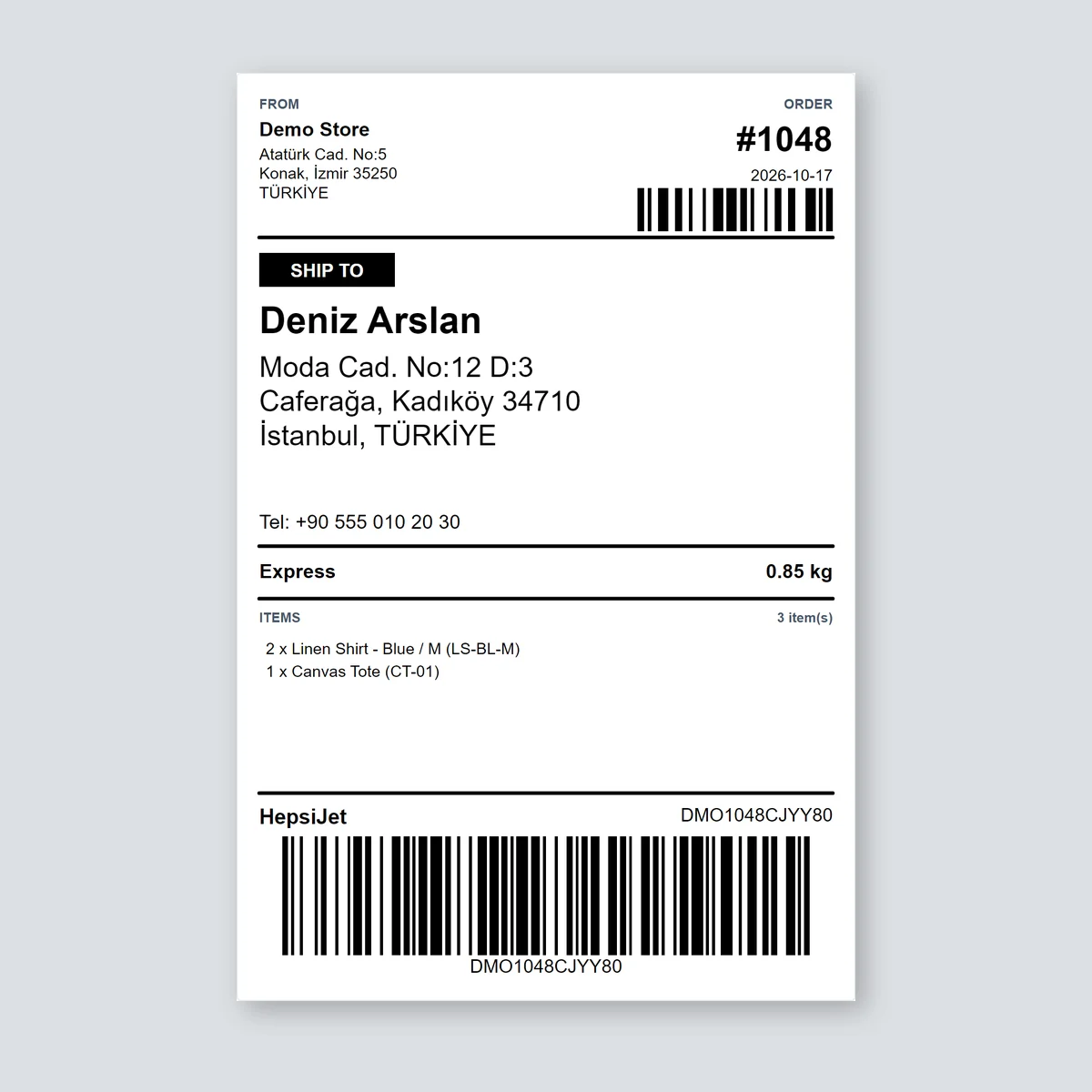
The HepsiJet integration connects your own agreement with HepsiJet to LabelInn. For every paid Shopify order the shipment is created at HepsiJet automatically, the tracking number and the HepsiJet barcode print on your shipping label, and the tracking number is written back to the order. You pay HepsiJet for postage under your agreement, not LabelInn.
Beta. Checked against HepsiJet's test server (a wrong login is refused correctly). Create, track and cancel are not yet proven with a real HepsiJet account. We are proving it with the first stores that connect; if something fails, the order waits unshipped and the reason shows in the panel.
01 / ACCOUNT
What you need from HepsiJet
A HepsiJet integration account: username, password, company abbreviation code, sender address id and cross-dock code (from your HepsiJet sales contact). Shipments are created under your own agreement and prices.
The connect form asks for:
- API username
- API password
- Company name (as HepsiJet has it)
- Company abbreviation code: HepsiJet barcodes start with it.
- Sender address id
- Cross-dock code (optional)
02 / STEPS
What LabelInn does, step by step
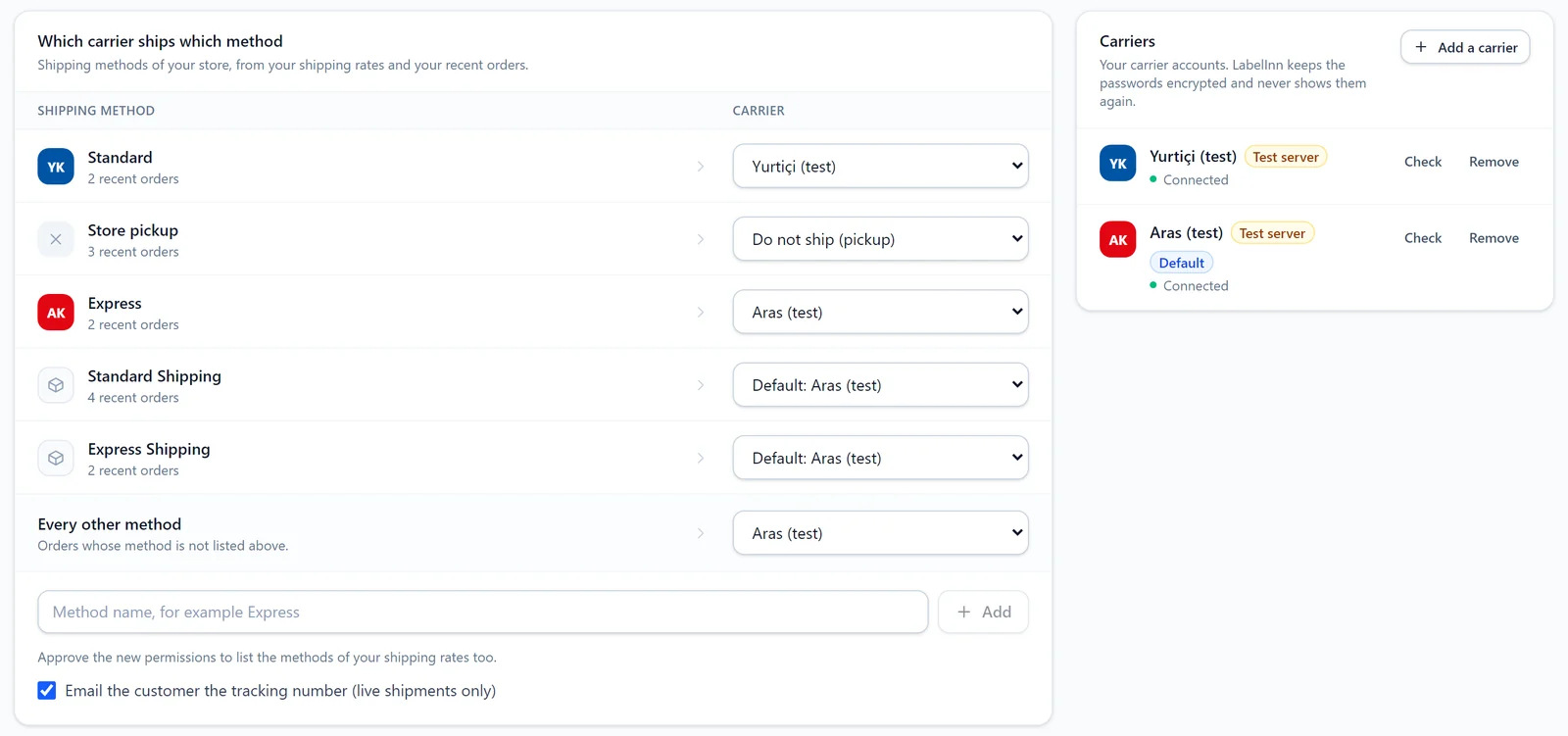
Map your shipping methods. "Standard: HepsiJet", "Express: another carrier", "Store pickup: do not ship". Pick a default carrier for every other method.
The order is paid, the shipment is created. LabelInn sends the order's address, phone and parcel details to HepsiJet; the shipment is created in your own account.
The label prints with the barcode. The tracking number, the HepsiJet barcode and the carrier name fill in on your shipping label, which prints on the thermal printer you choose or on an A4 sheet.
Tracking goes back to Shopify. Once you approve the new permission, the order is marked fulfilled with the tracking number; until then the number goes into the order note.
03 / DETAILS
Details of the HepsiJet connection
Carrier servers refuse orders over small rules. These are the ones LabelInn already handles for HepsiJet:
- You choose the barcode. HepsiJet lets the sender pick it: LabelInn builds a 9 to 16 character barcode that starts with the company abbreviation code HepsiJet gave you, and prints it on the label.
- The sender address is an id. HepsiJet knows your address by the sender address id in its records, which is why the connection asks for it.
- Cash on delivery is not offered through this connection.
- Cancel and multi-piece shipments are supported.
| Feature | HepsiJet |
|---|---|
| Cash on delivery | no |
| Cancel | yes |
| Tracking | yes |
| Multi-piece | yes |
| Barcode | Print the barcode on your label; HepsiJet scans it at pickup. |
| Status | Beta |
04 / LABEL
What is on the label
The label at the top of this page is drawn by the LabelInn Shopify app's 100 × 150 mm shipping template with a sample order: sender, recipient and address, shipping method, items, carrier name, tracking number and the Code 128 barcode the carrier scans. The number in the barcode is a sample; the real one is created once your HepsiJet account is connected. The customer details are sample data.
You can change the template in the LabelInn designer, add your logo, and print on 4 × 6 in, A6 or an A4 sheet. Tracking number, cargo barcode and carrier are ready-made fields you can bind into your own design.
05 / CHANNELS
Where the HepsiJet integration works
You set up the HepsiJet connection once; whichever way an order comes in, it goes to the same account.
- Shopify: in the Shipping tab of the LabelInn Shopify app you map your shipping methods to carriers. Every paid order is shipped automatically and the tracking number goes back to Shopify. Shopify carrier integration →
- Desktop app: in the new version of LabelInn, Settings > Cargo companies connects, tests and sets the default for the same carrier accounts.
- Automations (coming): the same shipment step for every row from Excel, Google Sheets, a database or an API. In the automation editor the "Create a cargo shipment" step is still marked "coming soon".
06 / SECURITY
Your password and your IP address
- Passwords are stored encrypted and never shown again. Not in the panel, not in the app; to change one you enter a new one.
- Requests can leave from your own PC. If HepsiJet whitelists an IP address for integrations, the carrier requests can be sent by your own computer with LabelInn open (new desktop version, Settings > Cargo). The carrier sees your own IP; no server IP to register.
- One order never ships twice. The key sent to the carrier is fixed per order; if a request is cut off, LabelInn first asks whether the shipment was created.
QUESTIONS / FAQ
Frequently asked questions
What do I need for the HepsiJet integration?
An integration agreement with HepsiJet and: API username, API password, Company name (as HepsiJet has it), Company abbreviation code, Sender address id. A HepsiJet integration account: username, password, company abbreviation code, sender address id and cross-dock code (from your HepsiJet sales contact).
Does the HepsiJet barcode label print automatically?
Yes. Once the shipment exists, the tracking number, the HepsiJet barcode and the carrier name fill in on the label and it prints on the printer you choose. Print the barcode on your label; HepsiJet scans it at pickup.
How do I set up a Shopify HepsiJet integration?
Install LabelInn from the Shopify App Store, add your HepsiJet account in the Shipping tab, map your shipping methods and turn on "Create the shipment automatically for every paid order".
Is the HepsiJet integration ready?
It is in beta. Checked against HepsiJet's test server (a wrong login is refused correctly). Create, track and cancel are not yet proven with a real HepsiJet account. You can connect it; if something fails, the order waits unshipped and the reason shows in the panel.
Who pays for postage?
You do, under your own HepsiJet agreement. LabelInn creates the shipment in your account; it does not resell postage.
Can an order be shipped twice by mistake?
No. The key sent to the carrier is fixed per order. If a request is cut off, LabelInn first asks whether the shipment was created, and "Try again" reuses the same key.
Can I cancel a shipment?
Yes, you can cancel the shipment from LabelInn before HepsiJet picks the parcel up.
KEEP GOING
Related
NEXT STEP / LABELINN
Create HepsiJet shipments from your orders
Connect your own HepsiJet agreement; paid orders are shipped and the label prints with the barcode. · Your own carrier agreement · Barcode on the label · Tracking back to Shopify