Connect your carrier account. Enter the user name and password the carrier gave you, once. "Check" tests the connection; for Yurtiçi and Aras you can also try the carriers' test accounts.
CARRIER INTEGRATION / 8 CARRIERS / SHOPIFY AND DESKTOP
Carrier Integration for Türkiye: Your Own Account, Barcode Labels, Tracking
Connect your own carrier account: Shopify orders ship automatically, the tracking barcode prints on the label, tracking returns to Shopify. Yurtiçi, Aras, MNG.
FREE PLAN · NO CREDIT CARD · WINDOWS / MAC / LINUX / WEB
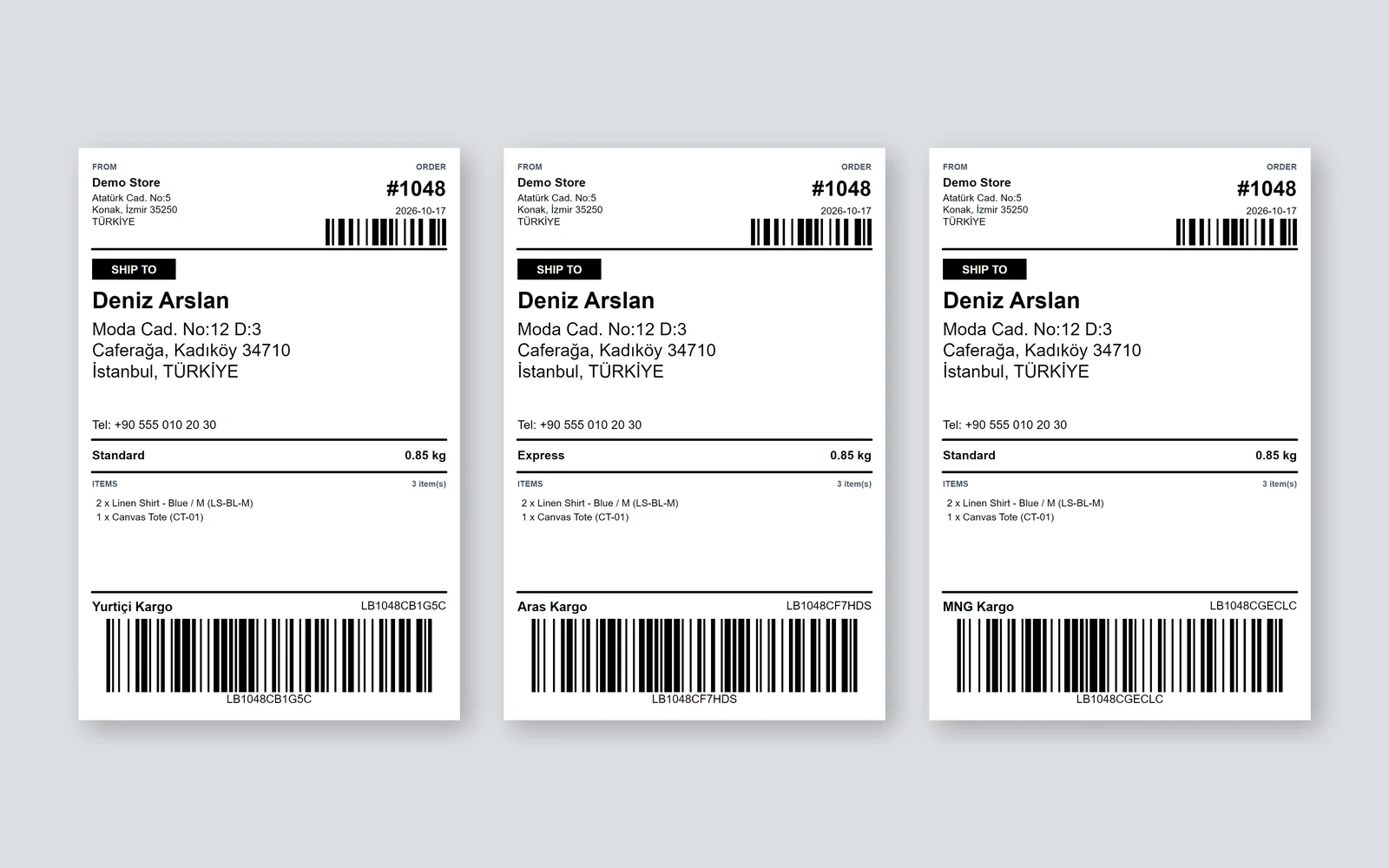
A carrier integration connects your own agreement with a carrier to your orders. LabelInn sends the order to the carrier under your account, prints the tracking number and the barcode the carrier scans on your shipping label, and writes the tracking number back to the order. You pay the carrier directly for postage under your agreement; LabelInn does not sit in between.
Today Yurtiçi Kargo and Aras Kargo are ready: both are proven on the carriers' test servers, creating and cancelling shipments. MNG Kargo (DHL eCommerce Türkiye), Sürat Kargo, PTT Kargo, HepsiJet, UPS Kargo (UPS Türkiye), Kolay Gelsin (formerly Sendeo) are in beta: built, waiting to be proven with a real customer account.
It works in Shopify. In the Shipping tab of the LabelInn Shopify app, map your shipping methods to carriers and ship every paid order with one switch. LabelInn on the Shopify App Store →
01 / CARRIERS
Carriers you can connect
The status comes from the carrier catalogue the apps draw their connect form from. Each carrier's page says what it needs from you, what LabelInn handles and what the label looks like.
| Carrier | Status | Cash on delivery | Cancel | Tracking |
|---|---|---|---|---|
| Yurtiçi Kargo | Ready | yes | yes | yes |
| Aras Kargo | Ready | yes | yes | with customer code |
| MNG Kargo (DHL eCommerce Türkiye) | Beta | yes | yes | yes |
| Sürat Kargo | Beta | yes | yes | yes |
| PTT Kargo | Beta | yes | yes | yes |
| HepsiJet | Beta | no | yes | yes |
| UPS Kargo (UPS Türkiye) | Beta | no | yes | yes |
| Kolay Gelsin (formerly Sendeo) | Beta | yes | yes | yes |
Ready: proven on the carrier's test server. Beta: built, being proven with a real account; if something fails, the order waits unshipped and the reason shows in the panel.
02 / HOW IT WORKS
From order to printed label
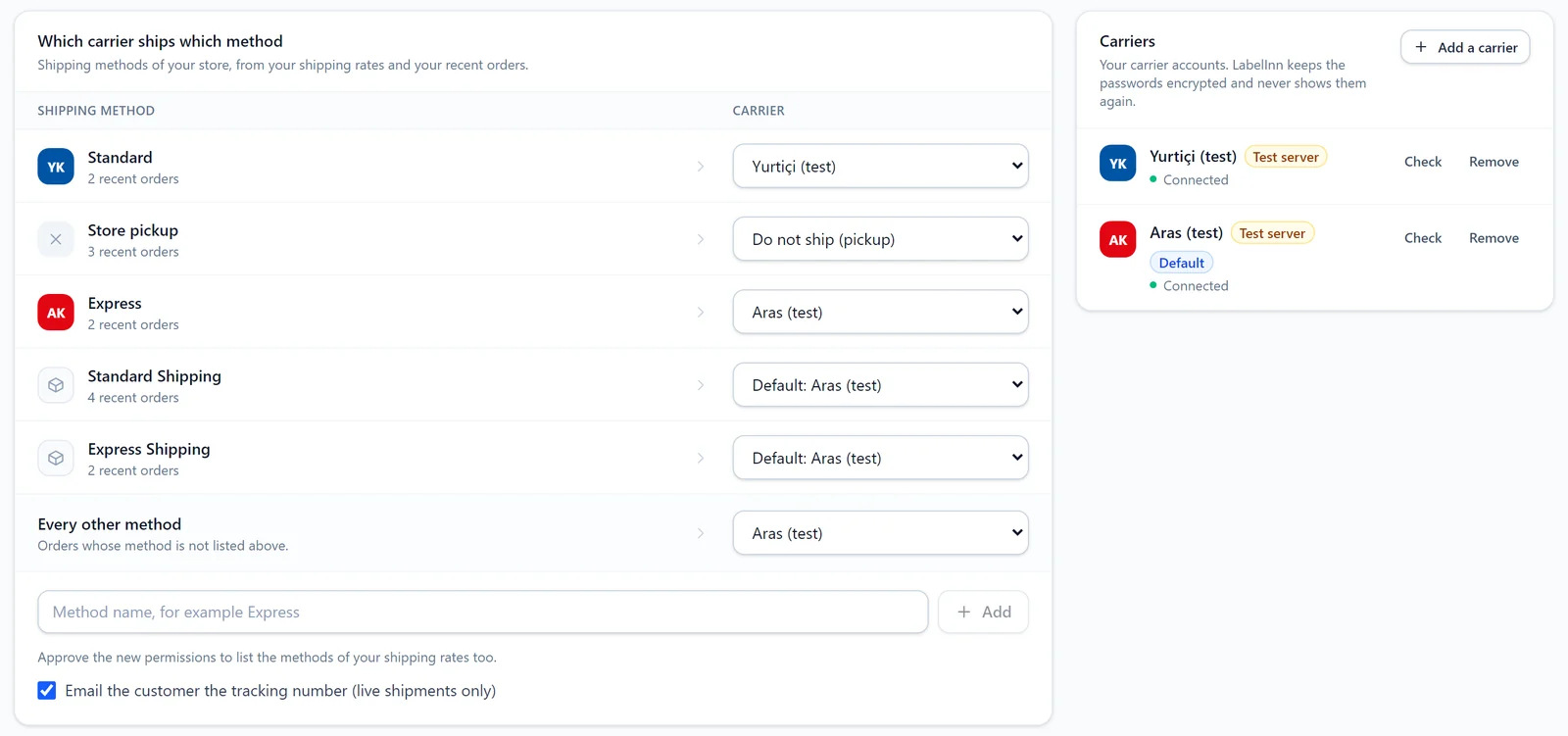
Choose which carrier ships which method. "Standard: Yurtiçi", "Express: Aras", "Store pickup: do not ship". Every other method goes to the default carrier.
The order is paid, the shipment is created. LabelInn shapes the address, phone and parcel details the way the carrier wants them and creates the shipment in your account.
The label prints with the barcode. Tracking number, carrier barcode and carrier name fill in on the label; on a thermal printer or an A4 sheet.
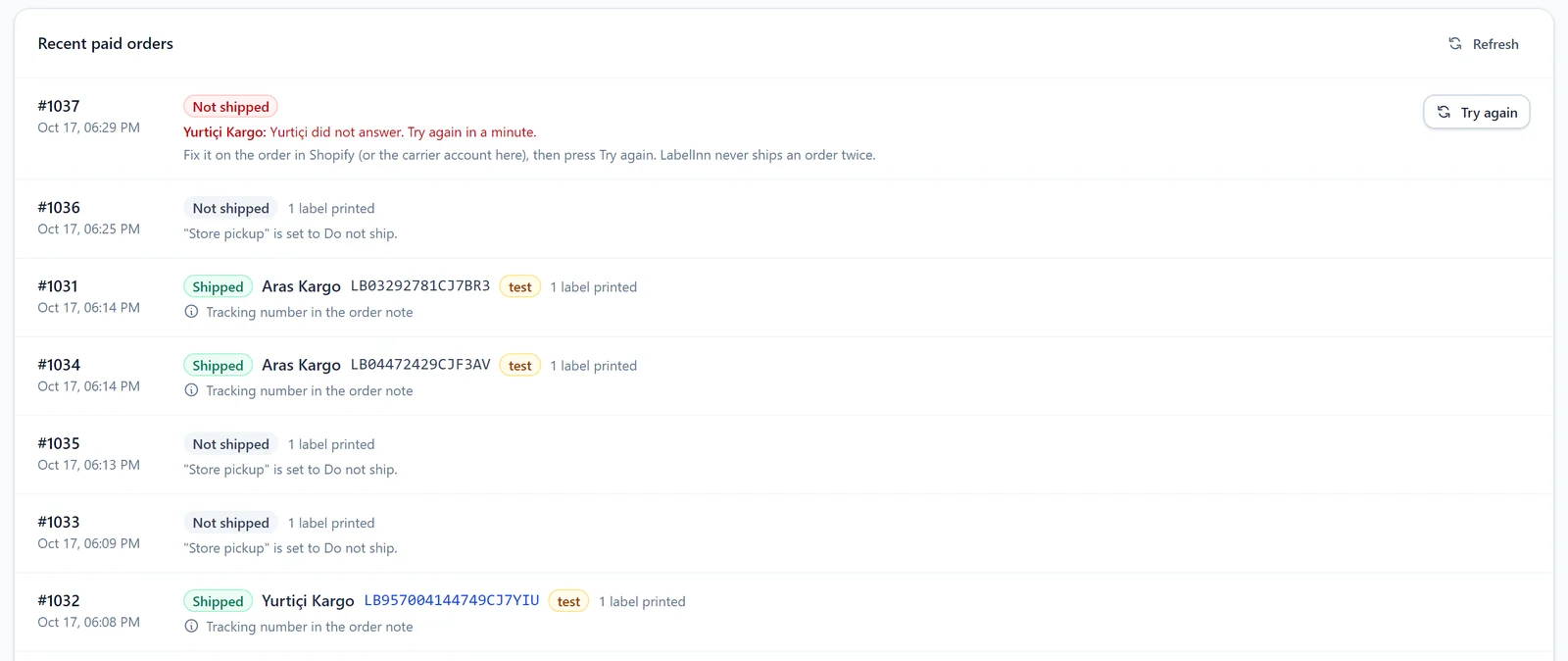
Tracking goes back to the order. Once you approve the new permission in Shopify, the order is marked fulfilled with the tracking number; until then the number goes into the order note and the order is tagged labelinn-shipped.
03 / SHOPIFY
Carrier integration in Shopify
For a Shopify store it is all in one tab: carriers, method mapping, the automatic-shipment switch and the shipping status of recent paid orders. Emailing the customer the tracking number through Shopify's shipping confirmation is optional (live shipments only).
04 / CHANNELS
Desktop app and automations
- Desktop: in the new version of LabelInn, Settings > Cargo companies shows the same catalogue: connected carriers, test, default carrier. A new carrier needs no app update; the list comes from the cloud.
- Automations (coming): the same shipment step for every row from Excel, Google Sheets, a database or an API. In the automation editor the "Create a cargo shipment" step is still marked "coming soon".
- Addresses worldwide: LabelInn's address model knows 252 countries, from Google's address data. Today's carriers ship within Türkiye.
05 / SECURITY
Passwords, IP address, double shipments
- Passwords are stored encrypted and never shown again.
- Requests can leave from your own PC. If your carrier whitelists an IP address for integrations, the requests are sent by your own computer with LabelInn open (new desktop version). The carrier sees your IP.
- One order never ships twice. The key sent to the carrier is fixed per order; after a request is cut off, LabelInn first asks whether the shipment was created.
- Cancel: you can cancel a shipment from LabelInn before the carrier picks the parcel up.
06 / COMING
Coming
Trendyol Express, DHL Express, UPS, FedEx, international carriers through Shippo. Trendyol Express has no shipment API of its own for merchants; Trendyol assigns it to marketplace orders, so it stays part of the Trendyol integration.
QUESTIONS / FAQ
Frequently asked questions
What is a carrier integration?
Your own agreement with a carrier, connected to your orders. When an order is paid, the shipment is created at the carrier automatically, the tracking number and barcode print on the label, and tracking is written back to the order.
Which carriers are supported?
Ready: Yurtiçi Kargo and Aras Kargo. Beta: MNG Kargo (DHL eCommerce Türkiye), Sürat Kargo, PTT Kargo, HepsiJet, UPS Kargo (UPS Türkiye), Kolay Gelsin (formerly Sendeo). Coming: Trendyol Express, DHL Express, UPS, FedEx, international carriers through Shippo.
Do I pay LabelInn for postage?
No. The shipment is created under your agreement and you pay the carrier directly.
How do I set up a Shopify carrier integration?
Install LabelInn from the Shopify App Store, add your carrier in the Shipping tab, map your shipping methods and turn on automatic shipments.
Is the tracking number written to Shopify?
Yes. Once you approve the new permission in Shopify, the order is marked fulfilled with the tracking number. Until then the number goes into the order note and the order is tagged labelinn-shipped.
Can the same order be shipped twice?
No. The key sent to the carrier is fixed per order, and "Try again" reuses the same key.
What does beta mean?
The connection is built and was checked against the carrier's test server, but creating a shipment has not been proven with a real customer account yet. You can connect it; if something fails, the order waits unshipped and the reason shows in the panel.
KEEP GOING
Related
NEXT STEP / LABELINN
Stop downloading carrier PDFs
Connect your own carrier agreement; paid orders are shipped, the label prints with the barcode, tracking goes back to the order. · Your own carrier agreement · Barcode on the label · Tracking back to Shopify