Open the label maker and pick "Label sheet". Type L7163 (or 14, or 99.1 x 38.1) in the search box and choose the A4 layout.
A4 SHEET / 14 PER SHEET / 99.1 × 38.1 MM
L7163 Label Template: 14 Labels Per A4 Sheet
L7163 compatible label template for A4: 14 labels per sheet, 99.1 x 38.1 mm. Exact margins and gaps, a test page, print from your browser. No signup.
FREE PLAN · NO CREDIT CARD · WINDOWS / MAC / LINUX / WEB
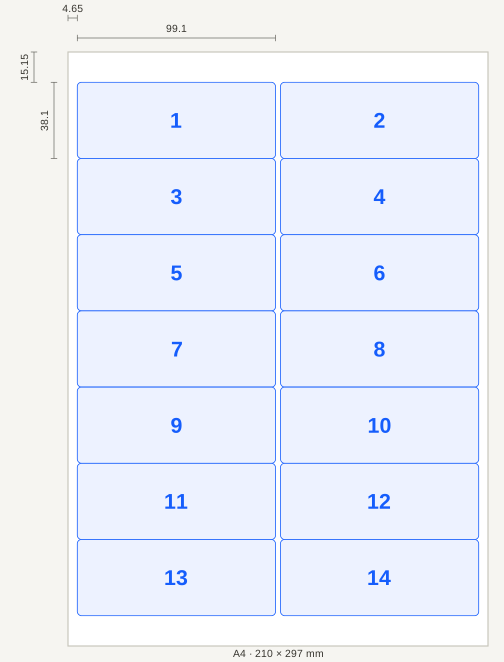
THE LAYOUT
The 14-up 99.1 × 38.1 mm layout is the one sold as L7163; the same size, count and position is sold under the codes J8563, LP14/99. It carries 14 labels of 99.1 × 38.1 mm on a single A4 sheet. LabelInn's free label maker has this layout built in: you design one label and it is repeated in every cell, in the right place.
No signup, no watermark. Choose "Label sheet", type L7163 in the search box, design your label and print. Open the free label maker →
01 / SHEET LAYOUT
L7163 measurements
The numbers below are the layout the designer prints with. They follow the maker's published template for this sheet, so a label sits where the die-cut is.
| Measurement | L7163 |
|---|---|
| Sheet | A4 (210 mm × 297 mm) |
| Labels per sheet | 14 (2 across × 7 down) |
| Label size | 99.1 mm × 38.1 mm |
| Left margin | 4.65 mm |
| Top margin | 15.15 mm |
| Gap between columns | 2.5 mm |
| Gap between rows | 0 mm |
| Right margin | 4.65 mm |
| Bottom margin | 15.15 mm |
Sheets of the same code can differ by a fraction of a millimetre between makers and print runs. Treat the table as the design target and confirm it with the test page before you print a full sheet.
02 / MEASUREMENTS
What fits on a 99.1 × 38.1 mm label
With 2 mm kept free at the edge, a 38.1 mm tall label holds about 6 lines of 12 pt text, and a QR code up to about 34 mm square fits with a clear border. Typical uses at this size:
- Full postal addresses with a company line
- Parcel and courier address labels
- Wide product labels with a barcode beside the text
- Mailing campaigns
Add a barcode or QR code from the designer's toolbar; the preview shows exactly what lands in each cell.
03 / PRINTING
Print L7163 labels in four steps
Design one label. Start from a template or a blank label: text, barcode, QR code, image. It is repeated in all 14 cells.
Print a test page on plain paper. It draws and numbers every cell. Hold it and a real sheet up to the light and check the outlines sit on the cut lines.
Print the sheet. In the print window choose paper size A4, scale 100% and margins None.
04 / ALIGNMENT
If the print is off the label
On this sheet the labels touch each other (no gap), so a shift of even 1 mm puts part of your design on the neighbouring label. Print the test page first and nudge until the outlines sit on the cut lines.
Fix a constant shift with the nudge: after a print the designer asks whether it landed in the right place and lets you move the whole grid in millimetres. The nudge is remembered for this layout. A half-used sheet can be reused too: set "Start at label" to the first free cell and the cells before it stay blank.
05 / SHEET LAYOUT
One label per row from Excel
Instead of repeating one design, attach an Excel or CSV file and each row prints on its own label on the sheet. A free account shows the first 10 rows; the Starter plan reads the whole file and starts with a 14-day free trial. How printing from Excel works →
QUESTIONS / FAQ
Frequently asked questions
What size is a L7163 label?
99.1 mm × 38.1 mm, with 14 labels on one A4 sheet (2 across, 7 down). The left margin is 4.65 mm and the top margin 15.15 mm.
Which sheets are the same as L7163?
Sheets sold as J8563, LP14/99 have the same label size, count and position as L7163. LabelInn does not make or sell label sheets; the codes are listed so you can match the box in your hand. Brand names belong to their owners.
Can I print L7163 labels without installing anything?
Yes. The label maker runs in your browser: design, then print or save a PDF. Set scale to 100% and margins to None in the print window. No account is needed to design and print a repeated label.
Why do my L7163 labels print slightly off?
Usually the browser or printer is scaling the page. Set scale to 100%, turn off "fit to page", then print the alignment test page on plain paper. A constant shift can be removed with the nudge in millimetres.
Should I buy laser or inkjet sheets?
Buy sheets made for your type of printer. The adhesive and coating on inkjet-only sheets can be damaged by the heat of a laser printer. For daily label volume, a thermal roll printer is usually faster and avoids sheet waste.
KEEP GOING
Related
NEXT STEP / LABELINN
Print L7163 labels from your browser
The L7163 layout is built in. Design a label once and print the whole sheet. · 14 labels per A4 sheet · Test page and nudge · Free, no watermark