THERMAL PRINTERS / WINDOWS AND MAC / UPDATED 17 OCT 2026
Thermal Printer Software: What Works on Windows and Mac
Thermal label software for Zebra, TSC, Toshiba TEC and Epson on Windows and Mac. Which printers work, how each connects, and when not to use it. Free plan.
SHORT ANSWER
Short answer. Thermal printer software does two jobs: it lets you lay out a label, and it sends the finished job to the printer in the command language that printer understands. LabelInn does both for printers that speak ZPL (Zebra), TSPL (TSC and many low-cost clones), TPCL (Toshiba TEC) or ESC/Label (Epson ColorWorks), on Windows and macOS, and it starts free. It is not the right tool for every printer or every shop, and the tables below say where.
Got a thermal printer on the desk? Plug it in, install the app, and see whether it finds the printer before you read further. Download LabelInn →
01 / PRINTERS
Which printer, which language, which connection
Find your printer in the left column. "Evidence" is what we can actually point to, using the labels on our printer pages.
| Printer family | Language LabelInn sends | Evidence | Read this first |
|---|---|---|---|
| Zebra ZD, GK, GX, ZT, ZM | ZPL II | Our bench printer is a GK420d over USB. ZD230, ZD410, ZD421, ZD621, GK420t, ZM400 and ZT231 have production-observed jobs; ZD220 is protocol-compatible only | Zebra printer software |
| TSC TE200, TE210, TE244, TE300, DA310, TDP-225, TTP-244 Pro | TSPL; auto-detect tries ZPL first on a TSC and falls back to TSPL | Production-observed TSPL jobs on every model listed except the TE200 (protocol-compatible) | TSC label printer software |
| Toshiba TEC B-EX4T, BV400, B-FV4 | TPCL only | TPCL byte forms checked on a physical B-FV4 / BV400 over USB; B-EX4T and BV400 have production-observed jobs | Toshiba label printer software |
| Epson ColorWorks and TM-C7500G | ESC/Label | Production-observed on CW-C4000e, CW-C6000Au, CW-C6500Ae and TM-C7500G | Epson printers |
| Xprinter, Gprinter, HPRT, iDPRT, Rongta, Zjiang, Postek | TSPL, if the model understands it | Auto-detect treats these names as TSPL-only. Not every model in these brands speaks TSPL | Xprinter and clone software |
| Bixolon, Argox, Citizen, SATO, Honeywell / Intermec | ZPL or TSPL, only if your model emulates it | There is no Bixolon, Argox, SATO or Citizen language in LabelInn. Auto-detect tries ZPL, then TSPL | Check the model's manual for a ZPL or TSPL emulation mode |
| DYMO LabelWriter 450 family | A native raster path built from DYMO's technical reference | Not yet confirmed on a physical LabelWriter | DYMO LabelWriter 450 |
| Brother, Godex, inkjet and laser label presses, receipt-only printers | None claimed | No native Brother or Godex language on this page. A model with a ZPL or TSPL mode may work; we make no promise | Use the maker's own software |
02 / CONNECTIONS
Windows and macOS: how each connection works
Connection support differs by operating system. This is what the code does, not what a brochure would like.
| Connection | Windows | macOS | Watch out for |
|---|---|---|---|
| USB | Opens the printer's USB print interface directly and reads status back. If the maker's driver already owns the device, LabelInn sends a RAW job through that printer's Windows queue instead. That path is one-way: no status readback | Opens the device through the macOS USB layer directly. No driver or queue is involved | Only one program can hold a USB printer at a time. Close the maker's own tool before you print |
| Network (Ethernet or Wi-Fi) | Raw TCP on port 9100. The printer window scans the network (mDNS and a port scan) or you type the IP address | The same | The scan only sees printers on your own network segment. Add by IP across a VLAN |
| Bluetooth | Beta | Beta | The Bluetooth discovery code is marked beta in the app. Use USB or network for a line that must not stop |
| Printing from Word or Chrome | A LabelInn printer queue, so any Windows app can print to a label printer. See the setup page | Not verified on macOS. Do not plan around it | The queue is for occasional documents. Designs made in LabelInn print without it |
Do you need a driver? Not to print from LabelInn. You can leave the maker's Windows driver installed for other programs; LabelInn does not need it, and uses it only as the fallback path above. See the connection guide for the exact screens.
03 / HOW IT PRINTS
What is actually sent to the printer
LabelInn lays the label out on your PC, renders it to a one-bit picture at the printer's own resolution, and sends that picture wrapped in the printer's own command language. The same label therefore looks the same on screen, on a Zebra, a TSC and a Toshiba, and any font on your computer works. Each language gets its own job:
| Printer language | What a LabelInn job looks like on the wire | Source |
|---|---|---|
| ZPL (Zebra) | ^XA, the media settings (width ^PW, length ^LL and the others your media definition sets), ^FO, the label as a compressed graphic field (^GF, Z64), ^PQ for copies, ^XZ | zpl_commander.dart |
| TSPL (TSC and clones) | SIZE, GAP or BLINE, DIRECTION, REFERENCE, SPEED and DENSITY only if you set them, CLS, the label as a PCX block, PRINT | tspl_commander.dart |
| TPCL (Toshiba TEC) | [ESC]D (size), [ESC]C (clear), [ESC]SG (the label as a bitmap, TOPIX-compressed), [ESC]XS;I (issue: copies, sensor, speed) | PRINTER_LANGUAGE_MATRIX.md |
| ESC/Label (Epson ColorWorks) | A colour raster job in Epson's own command set, with status read back | esclabel_commander.dart |
The trade-off is real. A printer-native text field is a few bytes; a picture is many more. Printer-resident formats, stored fonts and printer-side serial counters are not used: serial numbers are counted in LabelInn and each label is rendered with its own number. For a few hundred labels this is invisible. If you print many thousands a shift, test it on your printer first; we publish no throughput figure.
04 / WORKED EXAMPLE
Worked example: a carton label from a production line
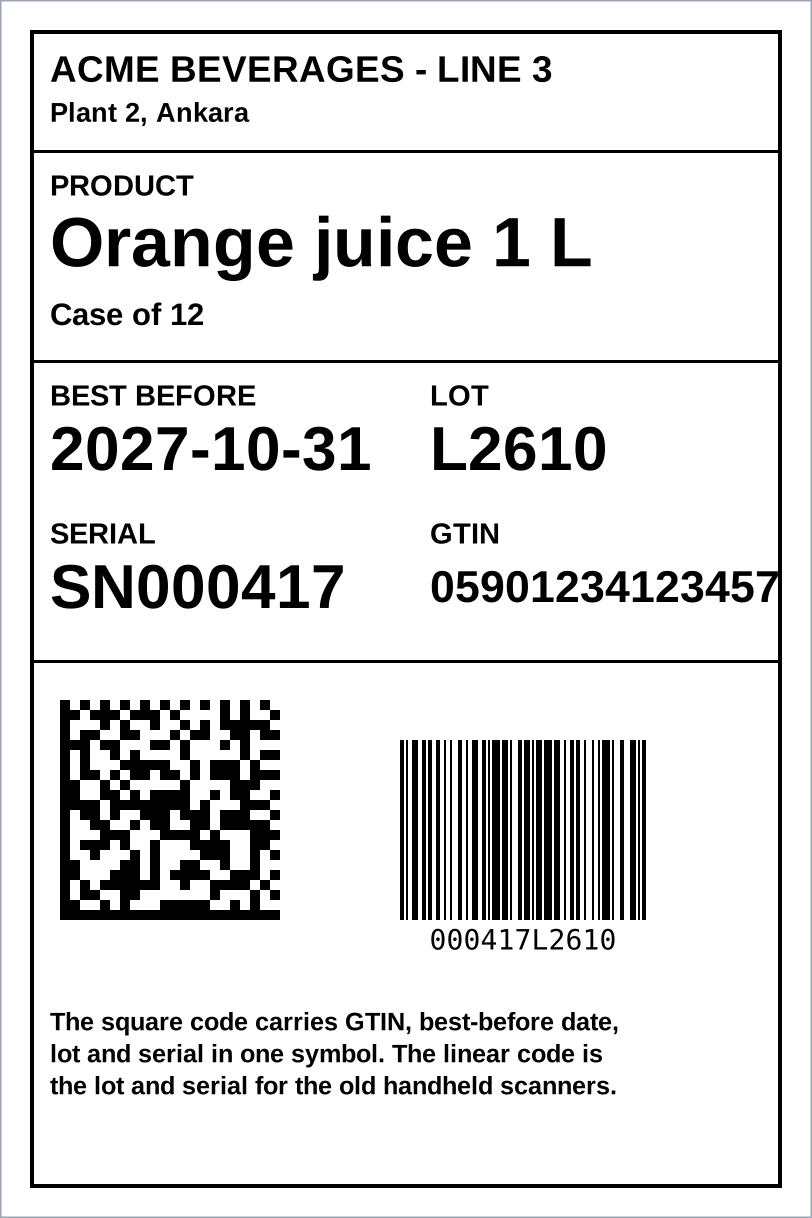
This is a 100 x 150 mm label at 203 dpi, which is 812 x 1218 dots. It carries a product name, a best-before date, a lot, a serial, the GTIN, a GS1 Data Matrix with all four values in one symbol, and a Code 128 for older scanners. The picture beside the title was drawn from the ZPL below by the ZPL viewer on this site: positions, boxes and barcode modules are exact, and the text uses a stand-in font because a browser cannot reproduce a printer's own fonts.
^XA
^PW812
^LL1218
^LH0,0
^FO30,30^GB752,1158,4^FS
^FO50,52^A0N,38,38^FDACME BEVERAGES - LINE 3^FS
^FO50,100^A0N,28,28^FDPlant 2, Ankara^FS
^FO30,150^GB752,3,3^FS
^FO50,172^A0N,30,30^FDPRODUCT^FS
^FO50,210^A0N,72,72^FDOrange juice 1 L^FS
^FO50,300^A0N,32,32^FDCase of 12^FS
^FO30,360^GB752,3,3^FS
^FO50,382^A0N,30,30^FDBEST BEFORE^FS
^FO50,420^A0N,64,64^FD2027-10-31^FS
^FO430,382^A0N,30,30^FDLOT^FS
^FO430,420^A0N,64,64^FDL2610^FS
^FO50,520^A0N,30,30^FDSERIAL^FS
^FO50,558^A0N,64,64^FDSN000417^FS
^FO430,520^A0N,30,30^FDGTIN^FS
^FO430,566^A0N,46,46^FD05901234123457^FS
^FO30,660^GB752,3,3^FS
^FO60,700^BXN,10,200,,,,_^FD_101059012341234571727103110L2610_121SN000417^FS
^FO400,740^BY2^BCN,180,Y,N,N^FD000417L2610^FS
^FO50,1010^A0N,26,26^FB700,3,6,L^FDThe square code carries GTIN, best-before date, lot and serial in one symbol. The linear code is the lot and serial for the old handheld scanners.^FS
^XZ
The square symbol encodes (01)05901234123457(17)271031(10)L2610(21)SN000417: GTIN 05901234123457, expiry 31 October 2027, lot L2610, serial SN000417. Paste the ZPL into the viewer to see it, change the lot, and watch the symbol change. In LabelInn itself you would not write this ZPL by hand; you place the Data Matrix, pick the Application Identifiers from a list, and bind each one to a column, a counter or a date rule. See GS1 barcode software and manufacturing label printing.
05 / DECISION
When LabelInn is the wrong tool
Match your situation. Several rows send you somewhere else on purpose.
| Your situation | Better choice | Why |
|---|---|---|
| Windows only, one Zebra, labels designed by hand, and the free tool is enough | ZebraDesigner Essentials | It is Zebra's own and free. Zebra's release notes list Windows only, so this stops being an answer the day a Mac joins. |
| A Mac, or a mix of Mac and Windows PCs, with more than one printer brand | LabelInn | One app on both systems that speaks four printer languages. |
| Labels filled from Excel, CSV, a shop, a database or an API | LabelInn (Starter or above) | Binding a data file is a paid feature. Free can design and print by hand. |
| Your ERP already sends ZPL to the printer and it works | Keep it | LabelInn can accept raw ZPL over its API, MQTT or gRPC, but if nothing is broken it adds little. |
You rely on printer-resident formats (^XF) or printer-side counters (^SN) | A ZPL-native tool | LabelInn renders every label on the PC and never uses those. |
| The printer is not Zebra, TSC, Toshiba TEC or Epson (or a clone that emulates ZPL or TSPL) | The maker's software | Outside the four languages LabelInn has nothing to send. |
| A validated pharma or medical installation already names BarTender or NiceLabel | Stay | Switching is then a validation project, not a download. |
06 / COST
What it costs
Free is $0 and covers designing, printing by hand, templates, serial counters and cloud sync. Starter is $7.99 a month ($79.90 a year) and adds Excel, CSV and Google Sheets binding and two saved workflows. Pro is $24.90 a month ($249.00 a year) and adds the production API, webhooks, database sources, watched folders, scheduled printing and marketplace and carrier connections. Enterprise is quoted and adds the Edge Server (local LAN API, MQTT, gRPC), audit logs, compliance mode and the approval queue. Yearly billing is ten months for twelve, and the 14-day trial includes the Pro and Enterprise features. Details on the pricing page.
QUESTIONS / FAQ
Frequently asked questions
What software do I need for a thermal printer?
Software that can lay out a label and send it in the command language your printer speaks: ZPL for Zebra, TSPL for TSC and many clones, TPCL for Toshiba TEC, ESC/Label for Epson ColorWorks. LabelInn does both on Windows and macOS. If your printer is outside those languages, use the maker's own software.
Is there free thermal printer software?
Yes. LabelInn's free plan designs labels, prints unlimited labels by hand, and includes templates, barcodes, serial counters and cloud sync. Binding an Excel or CSV file is on Starter at $7.99 a month. Zebra also offers ZebraDesigner Essentials free, for Windows only.
Does thermal printer software work on Mac?
Some does. LabelInn has a native macOS app that prints to Zebra, TSC, Toshiba TEC and Epson label printers over USB or the network. Zebra's ZebraDesigner 3 lists Windows only in its release notes. Printing from Word or Chrome to a label printer through a LabelInn queue is a Windows feature we have not verified on macOS.
Do I need a driver for my thermal printer?
Not to print from LabelInn. It talks to the printer in its own language over USB or the network. On Windows the maker's driver can stay installed for other programs; LabelInn uses it only as a one-way fallback when the driver owns the USB device.
Which thermal printers does LabelInn not support?
Printers outside ZPL, TSPL, TPCL and ESC/Label: there is no native Brother or Godex language, and no Bixolon, Argox, SATO or Citizen language either. A model with a ZPL or TSPL emulation mode may work. Inkjet and laser label presses and receipt-only printers are not the target.
How do I connect a TSC or Xprinter?
Connect it by USB or network, press + next to Printers, pick it from the scan, and press Connect. If the scan misses it, add it by IP address or as a USB printer and choose TSPL as the command language. Xprinter and TSC clones are detected as TSPL.
KEEP GOING
Related
NEXT STEP / LABELINN
Connect your thermal printer and print one label
Install the app, let it find the printer, and print a test label before you decide anything. · Zebra, TSC, Toshiba TEC, Epson · Windows and macOS · Free plan, no card