MANUFACTURING / INDUSTRIAL PRINTERS / UPDATED 17 OCT 2026
Manufacturing Label Printing Software: From the Line to the Carton
Production-line label software: lot, expiry and serial on every label, GS1 Data Matrix and GS1-128, started by a PLC, MES or operator. With honest limits.
SHORT ANSWER
Short answer. LabelInn is a labelling layer for a production line: it fills a label design with lot, expiry date, serial number and GS1 data, and prints it on Zebra, TSC, Toshiba TEC or Epson printers when an operator, a spreadsheet, a webhook or a PLC or MES message asks for it. It is not an MES or an ERP, it speaks no PLC protocol of its own, and it is not a validated system out of the box. The sections below show one real label end to end, then the limits.
Want to see it on your own label? Take one carton label you print today, rebuild it in the app and compare. The free plan covers designing and printing by hand. Download LabelInn →
01 / WORKED EXAMPLE
Worked example: a carton label for a 12-bottle case
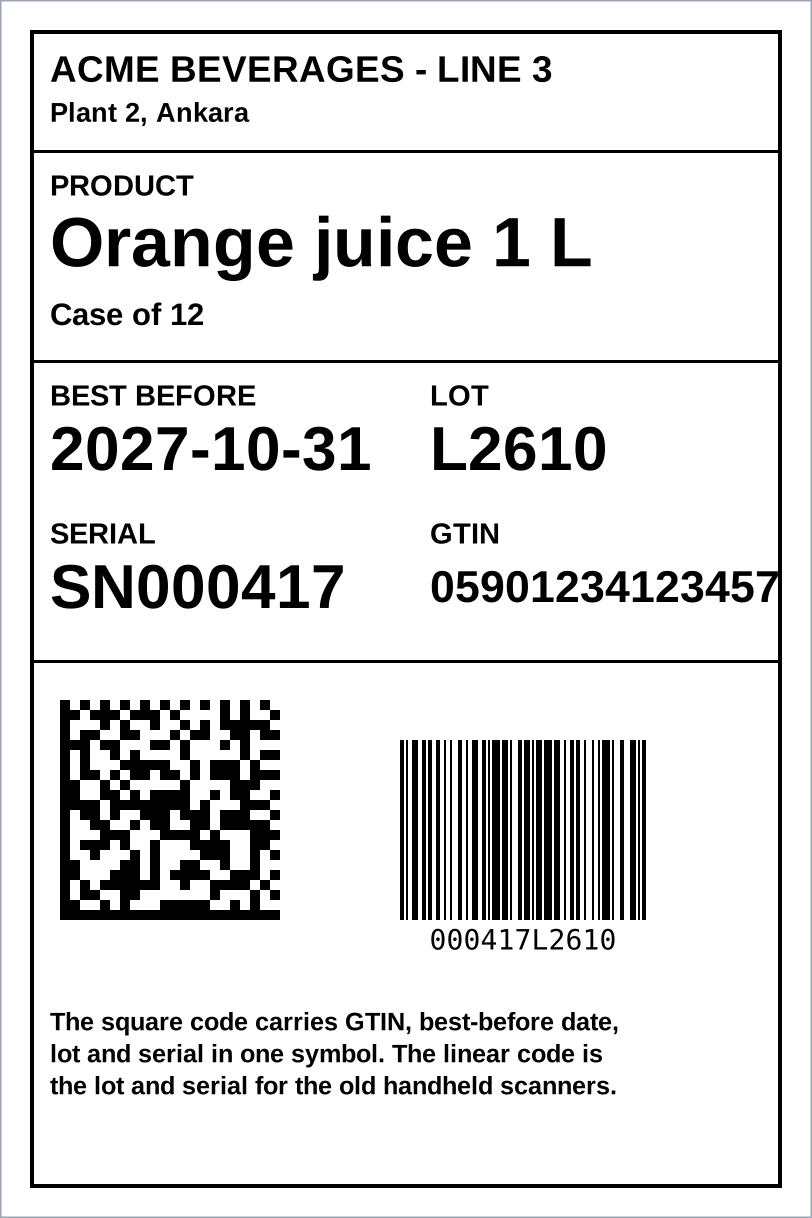
The label above is 100 x 150 mm at 203 dpi (812 x 1218 dots). It was drawn by the ZPL viewer on this site from a ZPL file, so positions, boxes and barcode modules are exact; the text uses a stand-in font. Each field comes from a different place:
| Field on the label | Where the value comes from | How LabelInn gets it |
|---|---|---|
| Product name, GTIN | Your product master (an Excel catalogue, a database or the ERP) | A Lookup node finds the row by GTIN and merges the name in. A webhook can send only the GTIN. See the node reference. |
| Lot | The MES, a PLC message or the operator | A field in the posted record, or typed at the Print Station by the operator (the Print Dialog node). |
| Best-before date | A rule, not a typed date | Today plus an offset, in any of 20 date formats. See expiry date and serial number labels. |
| Serial | A counter | A running number that increments or counts down, kept by LabelInn. Every label is rendered with its own number. |
| GS1 Data Matrix and Code 128 | The four values above, encoded | You pick Application Identifiers from a list; LabelInn checks each value's format and places the separators. See GS1 barcode software. |
The square symbol encodes the string below. The lot is variable length, so it is followed by a separator; the serial is last, so it is not.
| AI | Meaning | Value | Length rule |
|---|---|---|---|
| (01) | GTIN-14 | 05901234123457 | Fixed, 14 digits |
| (17) | Expiry, YYMMDD | 271031 | Fixed, 6 digits (31 October 2027) |
| (10) | Batch or lot | L2610 | Variable, up to 20; separator after it |
| (21) | Serial number | SN000417 | Variable, up to 20; last, so no separator |
At 203 dpi that symbol is 22 modules wide, drawn at 10 dots per module: 220 dots, or 27.5 mm. Check the module size against your scanner and your customer's specification; this page does not give a target. If you want to see the symbol change, paste the ZPL into the viewer and edit the lot.
02 / TRIGGERS
How the line asks for a label
Pick the row that matches how your line already signals. The plan column says what you need.
| The line signals with | LabelInn receives it as | Plan | Status |
|---|---|---|---|
| An operator scanning or typing a lot | The Print Dialog node at the Print Station | Pro | Shipped |
| A spreadsheet or CSV dropped in a folder | Data Source on a watched folder; one label per row. See hot folder printing | Pro | Shipped |
| An MES, ERP, Node-RED flow or script | A webhook: an HTTP POST with a JSON body | Pro | Shipped |
| A PLC through an MQTT-capable controller, SCADA or gateway | MQTT on the LAN, answered with the job result. See PLC and MES printing | Enterprise (Edge Server) | Documented on that page |
| An MES or robot cell that prefers typed calls | gRPC: SubmitJob, GetJobStatus, and VerifyScan to check a scanned code against what was printed | Enterprise (Edge Server) | Documented on that page |
| A sensor or scale posting readings | A webhook plus a Gate node, so a reading that stays over the limit prints one label, not one per reading | Pro | Run end to end on a Zebra GK420d on 15 October 2026; see the workflow page for what has and has not been run |
| A fixed time of day | The Scheduler node, for example expiry labels at 06:00 | Pro | Shipped |
The PLC itself is never wired to LabelInn. It reaches LabelInn the way the table says: a message on your network. A PLC with no network stack needs a gateway or a Node-RED flow in front of it.
03 / SEVERAL PRINTERS
Several printers on one line
- Route by a field. The Print node can take the printer from a column in the record, so each line or warehouse prints on its own printer. A Router can first pick a different design per product.
- One dashboard. Every connected printer gets its own card with its status. See label fleet management.
- Printers that are off. A job for a printer whose PC is offline waits in the queue.
- Industrial printers. Toshiba TEC B-EX4T (production-observed), Zebra ZT231 and ZM400 (production-observed), TSC DA310 and TE300 (production-observed). See Toshiba software and Zebra software.
We have not benchmarked labels per minute, and we publish no figure. LabelInn renders each label on the PC and sends it as a picture, which is more data than a printer-native text field. If your line prints thousands of labels an hour, test your printer with your design first.
04 / TRACEABILITY
Traceability: what you can show, and what you cannot
| You need | What LabelInn has | Plan |
|---|---|---|
| Who printed what, on which date | The print history archive, any date | Starter and above |
| A record that cannot be quietly edited | A hash-chained audit log: each record stores a hash of the one before, so a change breaks verification at the next record. See label compliance software | Enterprise (the trial includes it) |
| A person signing for a label | Compliance mode: re-authenticated electronic signatures | Enterprise |
| A second person approving a design or a print | The approval queue | Enterprise |
| Proof the printed code is the right one | gRPC VerifyScan, which checks a scanned barcode against what was printed | Enterprise (Edge Server) |
| A validation package (IQ and OQ) or a Part 11 certificate | Not offered. No label tool is certified for 21 CFR Part 11 or EU Annex 11; you own the validation, and LabelInn supplies tamper-evident records | None |
05 / LIMITS
Limits to read before you buy
| Limit | What it means for you |
|---|---|
| Not an MES or an ERP | It plans no production, holds no bill of materials and counts no units off the line. It prints what it is told to print. |
| No PLC protocol drivers | No Modbus, OPC UA or Profinet. A PLC reaches it through MQTT, gRPC, HTTP or a gateway. |
| Render and send | No printer-resident formats, stored fonts or printer-side serial counters (^SN). A counter lives in LabelInn. |
| Four printer languages | ZPL, TSPL, TPCL and ESC/Label. Inkjet and laser coders, direct part marking and print-and-apply interfaces are outside it. |
| The date is the PC's clock | Today plus an offset uses the clock of the PC that renders the label. A drifting clock prints a wrong expiry. Keep time sync on. |
| It does not grade barcodes | LabelInn encodes and prints GS1 barcodes correctly; grading print quality needs a barcode verifier. It does not issue GTINs and is not a GS1-certified product. |
| Edge features are Enterprise | MQTT, gRPC and the LAN API come from the Edge Server, an Enterprise feature. The webhook route is Pro. |
| A COM-port scale or sensor source | Built, and run on Windows with an ESP32 test rig, not on a production scale. The macOS and Linux serial paths have not been run. |
06 / DECISION
Decision: LabelInn or something heavier
| Your situation | Better choice | Why |
|---|---|---|
| SAP or Oracle shop with the vendor's own labelling module, or a validated BarTender, NiceLabel or Loftware installation | Stay | The integration and the validation work already exist. Replacing them is a project. |
| A handful of printers, GS1 and lot, expiry and serial labels, triggers from Excel, a webhook or an MES, and you want it running in days | LabelInn | This is what it is built for. Start on the free plan and the trial. |
| You must hand an auditor a validation package | A validated vendor | LabelInn gives you tamper-evident records on Enterprise, but the validation is yours to write. |
| Laser or inkjet coding straight onto product | The coder's own software | Not a label printer. |
| Several plants that must share one label library and one audit trail | Talk to us about Enterprise | Multi-location and the audit log are Enterprise features. |
07 / WORKED EXAMPLE
What it costs
Free is $0 and covers designing, printing by hand, templates, serial counters and cloud sync. Starter is $7.99 a month ($79.90 a year) and adds Excel, CSV and Google Sheets binding, full print history and two saved workflows. Pro is $24.90 a month ($249.00 a year) and adds the production API, webhooks, database sources, watched folders, scheduled printing, operator screens and marketplace and carrier connections. Enterprise is quoted and adds the Edge Server (local LAN API, MQTT, gRPC), audit logs, compliance mode and the approval queue. Yearly billing is ten months for twelve, and the 14-day trial includes the Pro and Enterprise features. Details on the pricing page.
QUESTIONS / FAQ
Frequently asked questions
What is manufacturing label printing software?
Software that fills a label design with production data (lot, expiry, serial, GTIN, SSCC) and prints it on industrial or desktop thermal printers, usually when a line, an operator or a system asks for it. It sits between your MES or ERP and the printer.
Can a PLC trigger label printing?
Not directly. The PLC, or a gateway in front of it, publishes an MQTT message or calls gRPC or HTTP on your network, and LabelInn prints and answers with the job result. MQTT and gRPC need the Edge Server, an Enterprise feature; a webhook needs Pro.
How do I print lot, expiry and serial numbers automatically?
Bind the lot to a field from your MES or the operator, set the expiry as today plus an offset, and add a counter for the serial. LabelInn renders each label with its own values, so no one types them.
Does LabelInn print GS1-128 and GS1 Data Matrix?
Yes. You pick Application Identifiers such as (01) GTIN, (17) expiry, (10) lot and (21) serial from a list, and it places the separators. It does not issue GTINs and does not grade print quality.
Which industrial printers does it support?
Toshiba TEC B-EX4T and BV400, Zebra ZT231 and ZM400, TSC DA310 and TE300 have production-observed jobs, and Epson ColorWorks over ESC/Label. Support follows the printer language: ZPL, TSPL, TPCL or ESC/Label.
Is there an audit trail for printed labels?
Print history is on Starter and above. The tamper-evident, hash-chained audit log, electronic signatures and the approval queue are Enterprise features, and the 14-day trial includes them. LabelInn is not certified for 21 CFR Part 11; the validation is yours.
KEEP GOING
Related
NEXT STEP / LABELINN
Rebuild one production label and print it
Take a label you print today, rebuild it in the app and compare the two. · Lot, expiry, serial, GS1 · Zebra, TSC, Toshiba TEC, Epson · Free plan, 14-day trial