FREE / NO SIGNUP / RUNS IN YOUR BROWSER
ZPL Viewer and Validator: See the Label and What Is Wrong With It
Paste ZPL to see the label drawn to scale, its size in mm and what is wrong with it. Free, runs in your browser, and your ZPL is never uploaded.
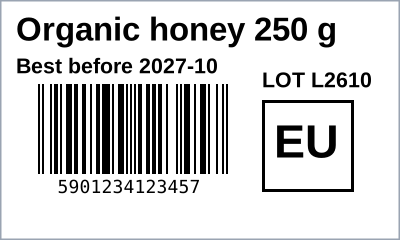
Layout preview
The label below is drawn from the ZPL above, in your browser, to scale: one unit is one printer dot. Box and line positions, graphics and the modules of Code 128, Code 39, EAN-13, UPC-A, Interleaved 2 of 5, QR Code and Data Matrix are exact. Text is drawn in a stand-in font, so its exact width and line breaks can differ from your printer.
Short answer. Paste ZPL into the box above and this page draws the label to scale, tells you its size in millimetres, lists what each command does, and warns you about the mistakes that cause blank or clipped labels. It runs in your browser and your ZPL is never uploaded.
01 / CHECKS
What it checks, and what it does not
Be clear about the limits before you trust a picture.
| Covered | Not covered | |
|---|---|---|
| Label | Size from ^PW and ^LL in dots and millimetres at 203, 300 or 600 dpi; the label frame; the home position (^LH) | The printer's own stored width, length or media settings |
| Fields | Positions from ^FO and ^FT; text size from ^A and ^CF; text blocks (^FB); reverse print (^FR); hex escapes (^FH) | The printer's own font glyphs. Text uses a stand-in font, so exact widths and line breaks can differ |
| Shapes and graphics | Boxes and lines (^GB), circles (^GC), embedded graphics (^GF as hex, run-length hex, B64 and Z64) | Diagonal lines (^GD), ellipses (^GE), stored graphics (~DG, ^XG) |
| Barcodes | Code 128, Code 39, EAN-13, UPC-A, Interleaved 2 of 5, QR Code, Data Matrix and GS1 Data Matrix, using the same Zint library the LabelInn app prints with. A value that cannot be encoded is shown as an error, not a picture | PDF417, MaxiCode, Aztec, Codabar, EAN-8, UPC-E and the rest are listed as not drawn. Code 128 subset codes are not interpreted |
| Mistakes | Missing ^XA or ^XZ, unbalanced blocks, no ^PW, a field with no ^FS, a field origin past the print width, content past the label length | Whether your printer firmware accepts a command; the media sensor; print darkness |
| Stored formats | Listed as not drawn (^XF, ^DF, ^FN) | Their contents. Paste the finished ZPL instead |
02 / PRIVACY
How it compares with other ZPL viewers
Several free viewers exist. They differ in one way that matters for real labels: where your ZPL goes.
| This viewer | Server-side viewers | |
|---|---|---|
| Where the ZPL goes | Nowhere. It is parsed and drawn in your browser | Sent to a rendering service. Labelary's own documentation says its API receives your ZPL on its servers and advises POST when the ZPL contains sensitive information. Its plan table lists Zero Data Retention as "No" on the Free plan (labelary.com/service.html, read 17 October 2026). The shippinglabel.co viewer says in its FAQ that it sends your ZPL to a rendering service |
| Text | Stand-in font, right position and size | Viewers built to emulate printer fonts can match printed text more closely. If exact text width matters, use one of them with non-sensitive ZPL |
| Limits | Limited by your browser | Labelary's documented API limits include 50 labels per request and a 1 MB request body |
| Extras | A command-by-command explanation and warnings, and the same barcode library as the LabelInn app | Image and PDF output through an API |
Label formats often carry customer names, addresses and order numbers. If yours do, a viewer that never uploads them is the safer default.
03 / NEXT STEP
From a viewer to a printed label
- To send ZPL to a printer, see how to send ZPL to a Zebra printer.
- To turn a spreadsheet into ZPL, see the CSV to ZPL converter.
- Dots and millimetres: the DPI calculator.
- To design labels visually and let LabelInn send the printer language for you, see Zebra printer software and thermal printer software. LabelInn renders each label on your PC and sends it as a picture in the printer's language.
04 / COMPATIBILITY
Which printers understand ZPL?
Zebra printers speak ZPL II natively. Many other makers add a ZPL emulation mode, so look for "ZPL II" or "ZPL emulation" in the spec sheet. LabelInn lists what it has evidence for on its printer pages, and its auto-detect tries ZPL first on a Zebra, a TSC and several other brands. It never probes a Toshiba TEC with ZPL, because that jams the B-FV4.
QUESTIONS / FAQ
Frequently asked questions
What is a ZPL viewer?
A tool that reads Zebra Programming Language (ZPL) and shows the label it describes, so you can check a label format before printing it. This one also reports the label size and the mistakes that stop labels printing.
Does this draw the label?
Yes, as a layout preview. Boxes, lines, graphics and the supported barcodes are drawn to scale from your ZPL. Text is drawn with a stand-in font, because a browser cannot reproduce a printer's own fonts, so text widths and line breaks can differ from the printed label.
Is my ZPL uploaded anywhere?
No. It is parsed and drawn in your browser. Label formats often carry customer names, addresses and order numbers, so it stays on your machine. Server-side viewers send it to a rendering service.
Why does the preview text look different from my printer?
Printers draw text from fonts built into their firmware. This viewer places the same text at the same position and size with a different font. Use the printed label, or a viewer that emulates printer fonts, when exact text width matters.
Why does it care about ^PW?
^PW sets the print width in dots. Without it the printer uses whatever width it was last configured with, a common reason a label prints fine on one machine and clipped on another.
Which printers are ZPL compatible?
Zebra printers natively. Many TSC, Honeywell, Bixolon, Argox and other models offer ZPL emulation. Check the spec sheet for ZPL II or ZPL emulation. A printer with only TSPL, TPCL or EPL needs its own language.
KEEP GOING
Related
NEXT STEP / LABELINN
Print the label, not just preview it
Design the label once in LabelInn and print it on the printer you own. · Zebra, TSC, Toshiba TEC, Epson · Windows and macOS · Free plan, no card