Pick your sheet. Search by labels per sheet (21), by size (63.5 x 38.1) or by the code on your box (L7160, 5160). A4 and US Letter are both there.
A4 AND LETTER / OFFICE PRINTER / FREE
Print Labels on A4 Sticker Sheets With the Printer You Already Have
Print labels on A4 and US Letter sticker sheets with the printer you already own. 24 sheet layouts built in, a test page, and no signup or watermark.
FREE PLAN · NO CREDIT CARD · WINDOWS / MAC / LINUX / WEB
THE IDEA
You do not need a label printer to print labels. A pack of A4 sticker sheets and the office inkjet or laser printer you already own are enough. The hard part is the layout: every sheet has its own label size, margins and spacing, and half a millimetre of error puts text across the cut line.
LabelInn's free label maker has 24 sheet layouts built in (15 on A4 and 9 on US Letter). Pick one by label count, size or the code printed on the box, design one label, and it is repeated in every cell at the right place.
Free, no signup, no watermark. Choose "Label sheet" when the designer opens. Open the free label maker →
01 / FREE DESIGNER
How it works
Design one label. Start from an address, product, food or asset template, or from a blank label. Text, barcodes, QR codes, images and shapes.
Print a test page on plain paper. Every cell is outlined and numbered. Hold it and a real sheet up to the light, and nudge in millimetres if it is off.
Print the real sheet. Paper size A4 (or Letter), scale 100%, margins None.
02 / SHEET CATALOGUE
A4 label sheets in the catalogue
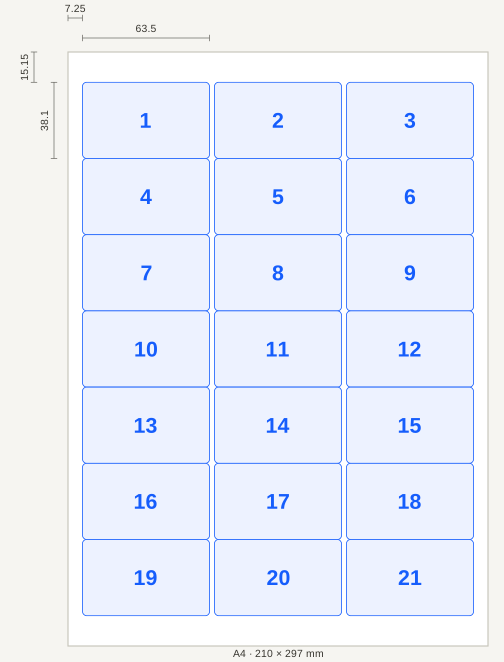
Sizes and positions follow each maker's published template. Click a count to see the exact measurements, the layout drawing and the capacity of that label.
| Per sheet | Label size | Grid | Compatible codes |
|---|---|---|---|
| 1 | Full page | 1 × 1 | L7167 |
| 2 | 199.6 × 143.5 mm | 1 × 2 | L7168, LP2/199 |
| 2 | 210 × 148.5 mm | 1 × 2 | 3655 |
| 8 | 99.1 × 67.7 mm | 2 × 4 | L7165, J8165, LP8/99 |
| 10 | 99.1 × 57 mm | 2 × 5 | L7173, LP10/99 |
| 14 | 99.1 × 38.1 mm | 2 × 7 | L7163, J8563, LP14/99 |
| 16 | 99.1 × 33.9 mm | 2 × 8 | L7162, LP16/99 |
| 18 | 63.5 × 46.6 mm | 3 × 6 | L7161, LP18/63 |
| 21 | 63.5 × 38.1 mm | 3 × 7 | L7160, J8160, LP21/63 |
| 21 | 70 × 42.3 mm | 3 × 7 | 3652, LP21/70 |
| 24 | 63.5 × 33.9 mm | 3 × 8 | L7159, LP24/63 |
| 24 | 70 × 37 mm | 3 × 8 | 3474, LP24/70 |
| 40 | 45.7 × 25.4 mm | 4 × 10 | L7654, LP40/45 |
| 40 | 48.5 × 25.4 mm | 4 × 10 | 3657 |
| 65 | 38.1 × 21.2 mm | 5 × 13 | L7651, J8651, LP65/38 |
The codes are listed so you can match the box in your hand: they are other makers' names for the same size, count and position. LabelInn does not make or sell label sheets, and brand names belong to their owners.
03 / ALIGNMENT
US Letter label sheets
The same designer covers the common Letter formats, from 30-up address labels to full-page labels.
04 / NEXT STEP
A half-used sheet, or a different label in every cell
A sheet you started last week still has free cells. Set Start at label to the first free cell and the ones before it stay blank, so nothing is wasted.
To print a different label in every cell, attach an Excel or CSV file: each row becomes its own label on the sheet. A free account shows the first 10 rows; the Starter plan reads the whole file and starts with a 14-day free trial. How printing from Excel works →
05 / FREE DESIGNER
Getting the alignment right
- Scale 100%, margins None. In Chrome and Edge the page sets the paper size; in Firefox turn off "Fit to page width"; Safari ignores the page size, so choose A4 yourself.
- Test page first. It also has two rulers: the 100 mm mark must sit 100 mm from the left edge. If it does not, the printer is scaling the page.
- Constant shift? Use the nudge. It is saved per sheet layout, so the 21-up sheet does not inherit the shift of the 65-up one.
- Match the sheet to the printer. Laser-rated sheets for lasers, inkjet-rated for inkjets. Heat can damage the coating on inkjet-only sheets.
06 / SHEET CATALOGUE
When a label printer makes more sense
Sheets are a good start: no new hardware, and they work well for a few hundred labels a month. Once you print labels every day (shipping, products, shelves), a roll-fed thermal label printer is faster, wastes no sheet and has no alignment to fight. Designs you save open in the LabelInn app, which prints to Zebra, TSC, Toshiba, Epson and other thermal printers. See thermal printer software →
QUESTIONS / FAQ
Frequently asked questions
Can I print labels on A4 sheets with a normal office printer?
Yes. Open the free label maker, choose "Label sheet", pick your layout, design one label and print. In the print window set paper size A4, scale 100% and margins None. Print the test page on plain paper first.
Do I need an account to print on label sheets?
No. Designing a label and printing it across a sheet works without an account. An account is needed to print one label per Excel row (a free account shows the first 10 rows), serial numbers and dates.
How do I find the layout for my sheet?
Type what is on the box into the search field: the number of labels per sheet (21), the label size (63.5 x 38.1), or the code (L7160, 5160). The catalogue includes a layout for each common A4 and US Letter format.
What if my labels print a few millimetres off?
Check scale 100% and that "fit to page" is off, then print the test page on plain paper. A constant shift can be removed with the nudge in millimetres; it is remembered for that sheet layout.
Can I use a half-used sheet?
Yes. Set "Start at label" to the first free cell. The cells before it stay blank.
Does LabelInn sell label sheets?
No. LabelInn is software. The sheet codes in the catalogue only help you match the box you bought. Brand names belong to their owners.
Is an A4 sheet or a label printer better?
Sheets suit a few hundred labels a month and need no new hardware. For daily shipping or product labels a thermal roll printer is faster and wastes no sheet. LabelInn works with both.
KEEP GOING
Related
NEXT STEP / LABELINN
Design once, print the whole sheet
Open the designer, choose Label sheet, and print on the printer you already have. · 24 A4 and Letter layouts · Test page and nudge · Free, no watermark