STARTER — $7.99/MO / 14-DAY PRO TRIAL ON SIGNUP
Print barcode labels from Excel to a thermal printer
Yes: add your .xlsx file as a data source in LabelInn, point each label field at a column, and print one label per row on a thermal printer. Download the sample workbook below to run the whole flow in ten minutes, and use the table further down to see what happens to zeros, dates, formulas and long numbers.
Video / 1:08
Watch: Print labels from Excel
1:08 walkthrough in the real app. Step-by-step page →
HOW IT WORKS
Three screens from data to printed label.
No copy-paste, no hunting for templates. The same flow repeats for every record.
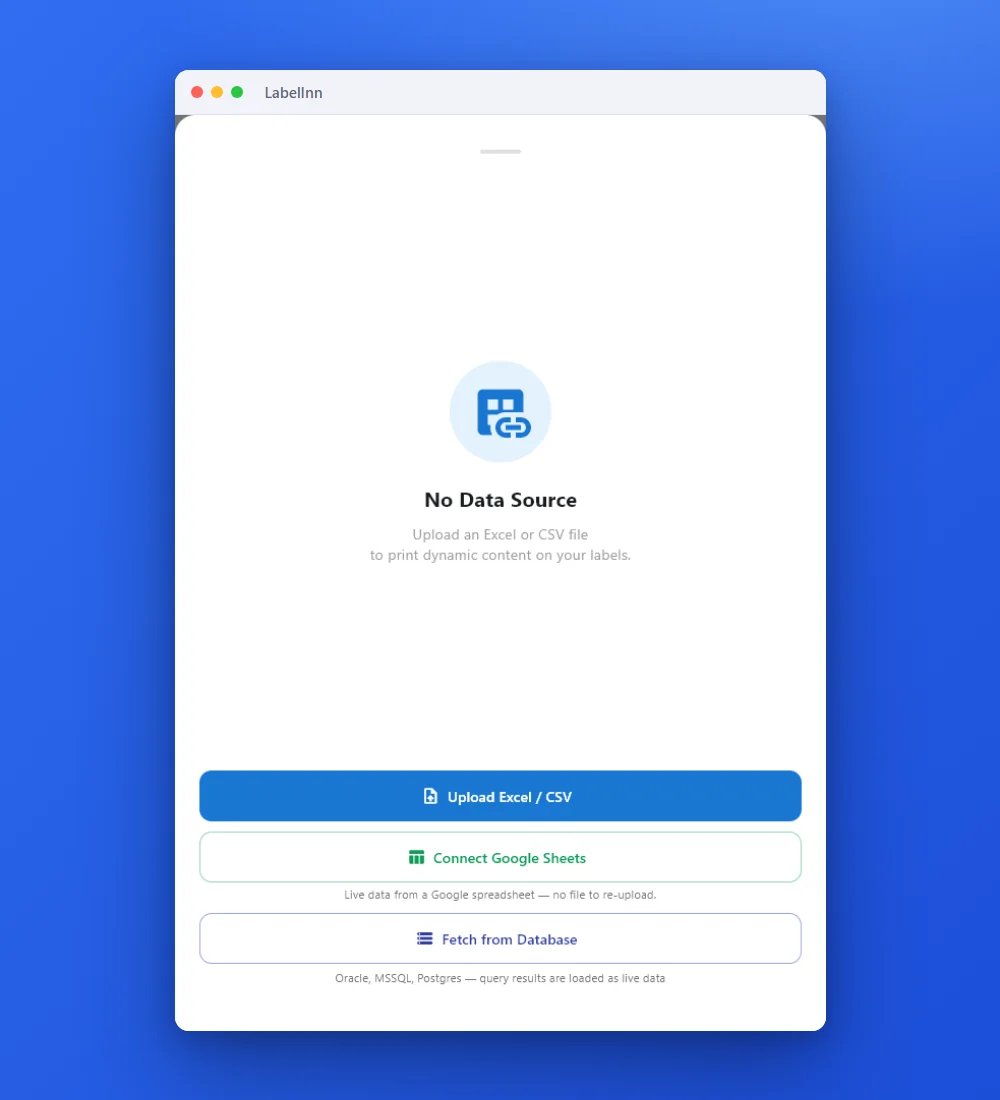
Add the Excel or CSV file as the data source; no export step.
Preview the data, then drop a column onto a text, barcode or QR field.

Rows × copies = total labels, shown before you press print.
01
Who this is for
Warehouse, production and e-commerce teams whose product, order or batch data already lives in a spreadsheet and who currently retype it into a label designer.
02
Step by step
Seven steps, using the same screens you will see in the app. The screenshots are real.
- Open the label you want to print, or start an empty one, and set the label size. The sample labels are 60 x 40 mm.
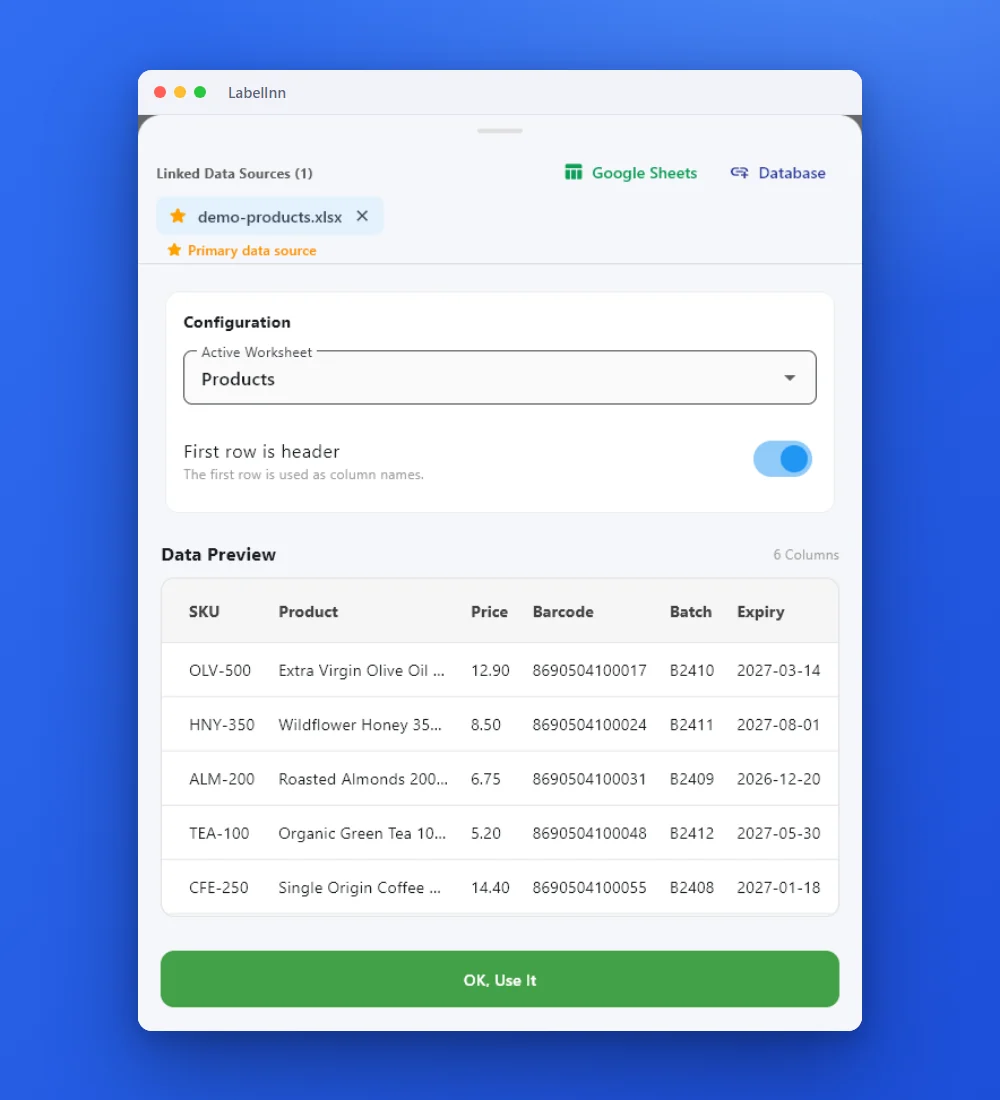
- In the data panel choose Upload Excel / CSV and pick
labelinn-sample-products.xlsx. - In the Configuration card choose the Active Worksheet (
Products) and keep First row is header switched on. Check that Data Preview shows six columns, then press OK, Use It. - Select a text element, open its Data tab and, under Content data, pick the table icon (Excel/CSV). Choose the column. Repeat for every element using the mapping table below.
- Select the barcode element, set its type to EAN-13 and bind it to the
Barcodecolumn. - Open the print dialog. Label Numbers takes
1-8, a range such as2-5, or a mix such as1,3,5-8. Copy Count is Fixed (the same for every label) or From Data Field (each row's own count). The dialog states the total, for example "8 rows x 1 copies = 8 total labels". - Choose the printer and press Print.
Mapping for the sample file
| Label element | Type | Column in the sample | Row 1 prints |
|---|---|---|---|
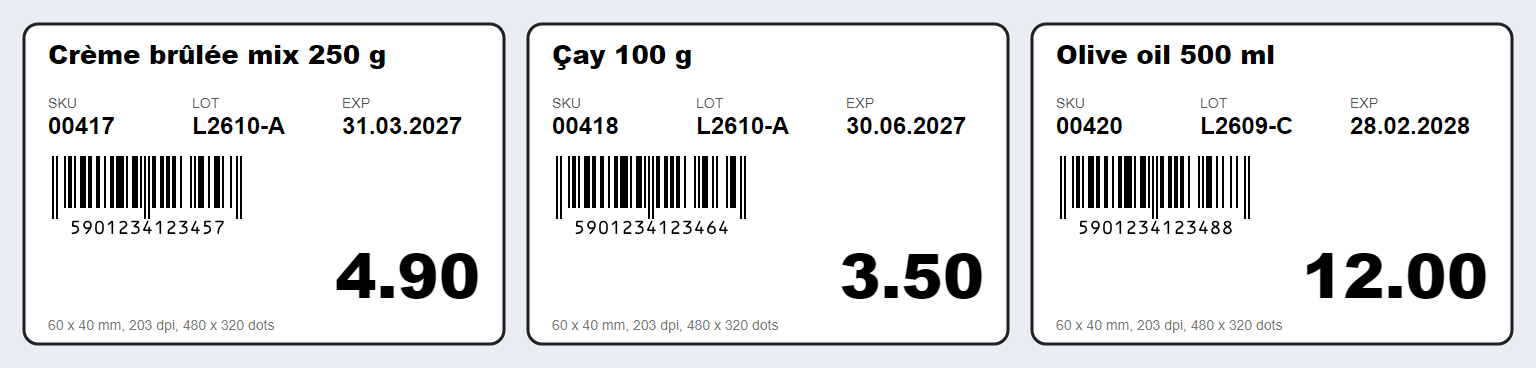
| Product name | Text | Product | Crème brûlée mix 250 g |
| SKU | Text | SKU | 00417 |
| Lot | Text | Batch | L2610-A |
| Expiry | Text | Expiry | 31.03.2027 (from the xlsx), 2027-03-31 (from the csv) |
| Price | Text | Price | 4.9 from the xlsx number cell, 4.90 from the csv or a text cell |
| Barcode | EAN-13 | Barcode | 5901234123457 |
03
What you can do
- One label per row across the whole sheet, or a selected row range.
- Columns can drive barcode content, so EAN-13, Code 128, GS1-128 and QR values come straight from your data.
- Mixed sources on one label: some fields from the sheet, others static, serialized or date-based.
- Counters and serial numbers can continue across a batch instead of restarting per row.
- Every printed row can be captured in the print history for later reprint or audit.
04
Technical details
| Item | Detail |
|---|---|
| Files that import | .xlsx and .xlsm (zip-based workbooks) and .csv. The file picker also lists .xls and .xlsb, but the importer cannot read them: save as .xlsx first. |
| Protected workbooks | A password-protected .xlsx (and old .xls) is reported as protected. Remove the password, save, import again. |
| Sheets and header | Pick the sheet in Active Worksheet. With First row is header off, columns are named A, B, C and so on. |
| Where the file is read | Parsed on your PC; Microsoft Excel does not need to be installed. When you are signed in and design sync is on, a copy of the workbook is stored with the design in your company's cloud storage so the design opens with its data on your other devices. |
| Row behaviour | One label per row in sheet order; Label Numbers picks any subset. |
| Cell conversion | See the table below: numbers lose zeros, dates become dd.MM.yyyy, numeric formulas arrive as formula text. |
| Free plan | You can load a workbook and see its first 10 rows. Binding columns to elements and printing the set need Starter ($7.99/month, $79.90/year). |
| 14-day trial | Signing up starts a 14-day Pro trial that includes Excel and CSV binding, so you can test with your own workbook first. During the trial a batch is limited to 200 labels. |
05
Limits and honest caveats
- Only
.xlsx,.xlsmand.csvare read..xlsand.xlsbare accepted by the file picker and then refused. - A numeric formula (
=A2*B2) arrives as its formula text, not its result. Paste values first. - Numbers are numbers: leading zeros, trailing zeros and anything beyond 15 digits are not preserved unless the cell is Text.
- Dates always print as dd.MM.yyyy (with time: dd.MM.yyyy HH:mm) unless you keep them as text.
- Excel and CSV binding needs Starter or higher; the Free plan shows the first 10 rows only.
07
What we verified
The capability is implemented in the LabelInn codebase and the referenced source file names the exact format, engine, port or endpoint described on this page.
lib/providers/data_manager.dart — file picker accepts xlsx, xlsm, xls, xlsb, csv
SAMPLE FILE
Start with a workbook that is known to import
Eight products, three sheets. The workbook was written with the same excel library the app reads files with, and parsed with the app's own import code before it was published.
| Sheet | What it is for |
|---|---|
Products | The clean sheet: SKU and barcode as text, price as a number, expiry as a real date. Follow the steps on this page with it. |
Products-numeric-SKU | The same rows with the SKU typed as a number and shown as 00417. Import it to see the classic zero-loss mistake. |
Pallets | An 18-digit SSCC stored as text next to the same code stored as a number, to show what long numbers do. |
WHAT THE IMPORTER DOES
What happens to each kind of cell
This is the part that decides whether a printed label is right. Measured by running the app's xlsx reader over the sample workbook, not copied from a manual.
| Cell in the workbook | Text the label receives | What to do |
|---|---|---|
SKU typed as text: 00417 | 00417 | Nothing. This is the Products sheet. |
SKU typed as a number and displayed as 00417 with a 00000 format | 417 | Zeros are a display format, not data. Format the column as Text before typing, or type '00417. Sheet Products-numeric-SKU shows it. |
| Price 4.90 stored as a number (shown with 2 decimals) | 4.9; 12.00 becomes 12 | Store prices as text if the label must show two decimals. A CSV keeps 4.90 as written. |
| A real date, 31 March 2027 | 31.03.2027 | Always dd.MM.yyyy, whatever format the cell displays. With a time: dd.MM.yyyy HH:mm. For another look, store the date as text. |
| An 18-digit code stored as a number (SSCC) | 305901234000000000 for all three pallets | Excel keeps 15 significant digits, so the last three become 0 and different pallets collide. Store long codes as text (sheet Pallets). |
A formula that returns a number, =A2*B2 | A2*B2 (the formula, not 13.5) | Copy the column, Paste Special, Values, then save. The cached result is ignored for numeric formulas. |
A formula that returns text, ="Total: "&C2 | Total: 13.5 | Nothing: the saved text result is read. |
| An empty cell | empty string | Use a conditional element on the label if empty fields should hide a line. |
On 17 October 2026 the .xlsx parser from lib/providers/data_manager.dart (package excel 4.0.6) was run over labelinn-sample-products.xlsx; the table shows its output. The formula rows used a workbook with the saved result present, which the reader ignores for numeric formulas.
Not checked: a workbook saved by every version of Microsoft Excel. If your file behaves differently from this table, write to us with the file.
TROUBLESHOOTING
If the labels come out wrong
- Zeros are gone from SKUs or postcodes. The cell was a number with a display format. Convert the column to Text, retype, save, import again. In a CSV the zeros survive because every value is read as text.
- The barcode shows a rounded number. More than 15 digits in a numeric cell. Store GTIN-14, SSCC and similar codes as text.
- **A column prints
A2*B2.** It is a formula. Copy, Paste Special, Values. - Dates print as 31.03.2027 and you wanted 2027-03-31. Dates are normalised to dd.MM.yyyy. Keep that column as text in the format you want printed.
- Import says the file is protected or not supported. Password-protected workbooks and
.xls/.xlsbcannot be read. Save a copy as.xlsxwithout a password. - Only 10 rows are available. That is the Free plan preview. Starter and the 14-day trial lift it.
- Another worksheet is needed. Change Active Worksheet in the data panel; the preview updates.
GOING FURTHER
Longer guide, other sources, automation
The long walkthrough with layout advice is the blog guide Bulk label printing from Excel. For a CSV export from another system use print labels from CSV; on a Mac see Excel labels on a Mac; when the data lives in a database see SQL Server, PostgreSQL and MySQL. To turn rows into printer code without installing anything, try the free CSV to ZPL converter.
ANY PRINTER
Design it, bind your data, print on the printer you already own.
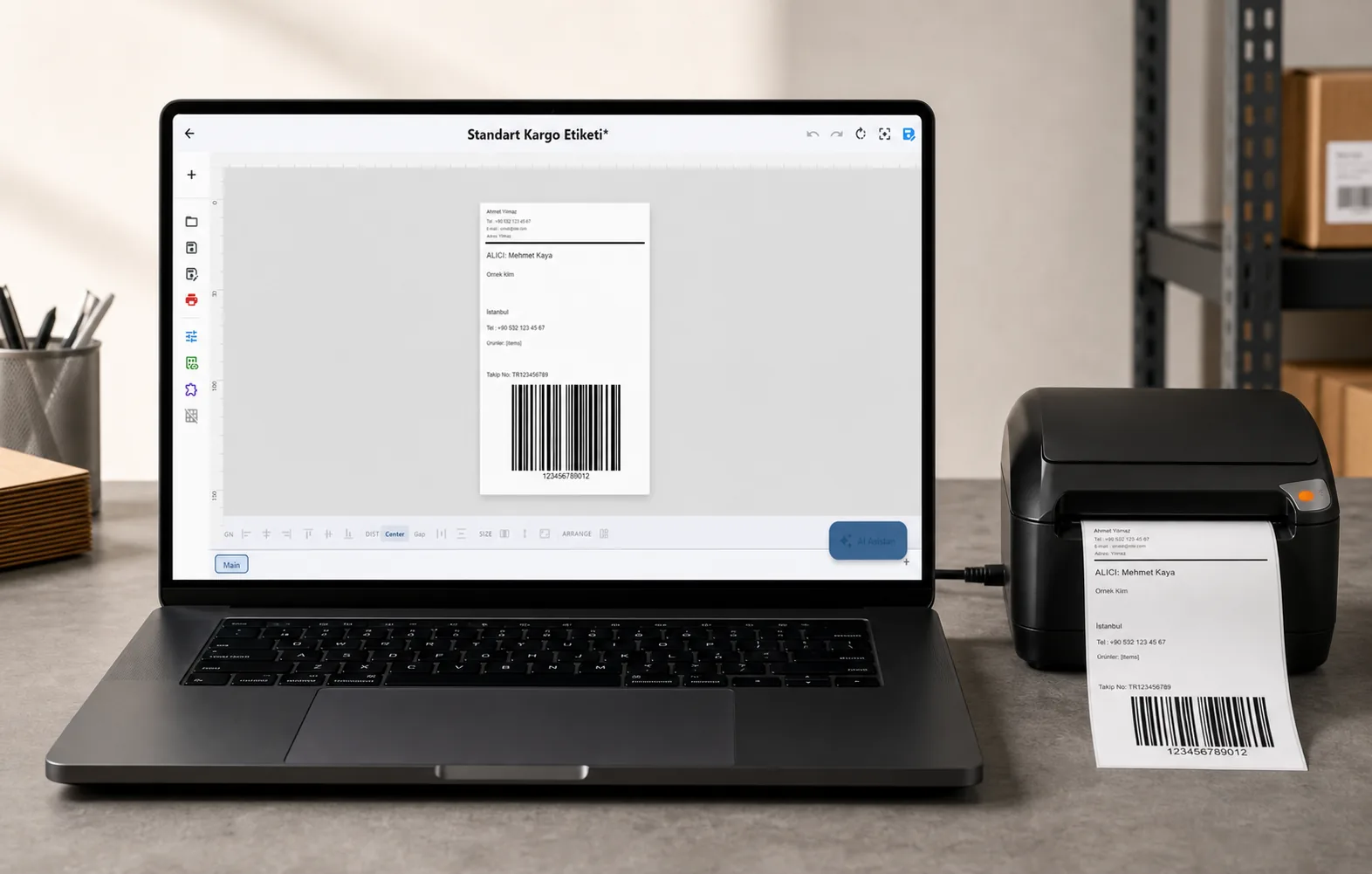
Zebra, TSC, Toshiba, Epson and more — over USB, network or Bluetooth, with no driver to install.
PRICING
Start free. Pay when it earns its keep.
QUESTIONS / FAQ
Frequently asked questions
Can I print labels from Excel without installing a printer driver?
Yes for thermal models LabelInn drives natively over ZPL, TSPL or TPCL — it sends printer commands directly over USB or TCP. Models that only expose an operating-system driver path use that driver instead.
Does the Excel file get uploaded anywhere?
No. The workbook is read on your own computer. Only the label design and the print record leave the machine, and only if you are signed in to a plan that syncs them.
How many rows can I print in one batch?
There is no fixed row cap in the designer. Practical limits come from the printer and the label size, so start with a small range to confirm alignment before running the full sheet.
Can you print labels from Excel?
Yes. Add the workbook as a data source in LabelInn, bind each label field to a column and print one label per row on a thermal printer such as a Zebra, TSC, Toshiba or Epson ColorWorks. Sheets of address labels on an office inkjet or laser printer are a different job, usually done with Word mail merge.
How do I print barcode labels from Excel?
Put the barcode values in a column, store them as text so no digits are lost, then bind a barcode element (EAN-13, Code 128, QR and others) to that column. The barcode is generated from the value on every row. The sample workbook has a valid EAN-13 column to try it.
Which Excel file types can LabelInn import?
.xlsx and .xlsm workbooks and .csv files. The file picker also lists .xls and .xlsb but the importer cannot read them, so save those as .xlsx first.
Why did the leading zeros disappear?
Because the cell is a number that only looks like 00417 through a display format. The file stores 417. Format the column as Text before typing the codes, or import a CSV, where every value is read as text.
Does Excel formula output import?
Formulas that return text import as that text. Formulas that return a number arrive as the formula itself (for example A2*B2), so paste the results as values before you save the workbook.
Does LabelInn upload my Excel file?
The file is parsed on your PC. When you are signed in with design sync on, a copy is stored with the design in your company's cloud storage so that the design opens with its data on your other devices.
Do I need Microsoft Excel installed?
No. LabelInn reads the workbook itself. Workbooks exported from Google Sheets, Numbers or LibreOffice as .xlsx or .csv import the same way.
How many rows can I print, and what does the Free plan allow?
There is no row cap in the designer. On the Free plan you can load a workbook and see its first 10 rows; binding and printing the whole sheet need Starter ($7.99/month). The 14-day trial from sign-up includes it, limited to 200 labels per batch.
KEEP GOING
Related pages
NEXT STEP / LABELINN
Print your Excel data on the printer you already own
This feature runs on Starter — $7.99/mo, or $79.90/year (pay for 10 months, use 12). Signing up starts a 14-day Pro trial, so you can bind your own Excel data and print a real label before you pay anything. · 14-day Pro trial on signup · No credit card required · Windows, macOS, Android, Web