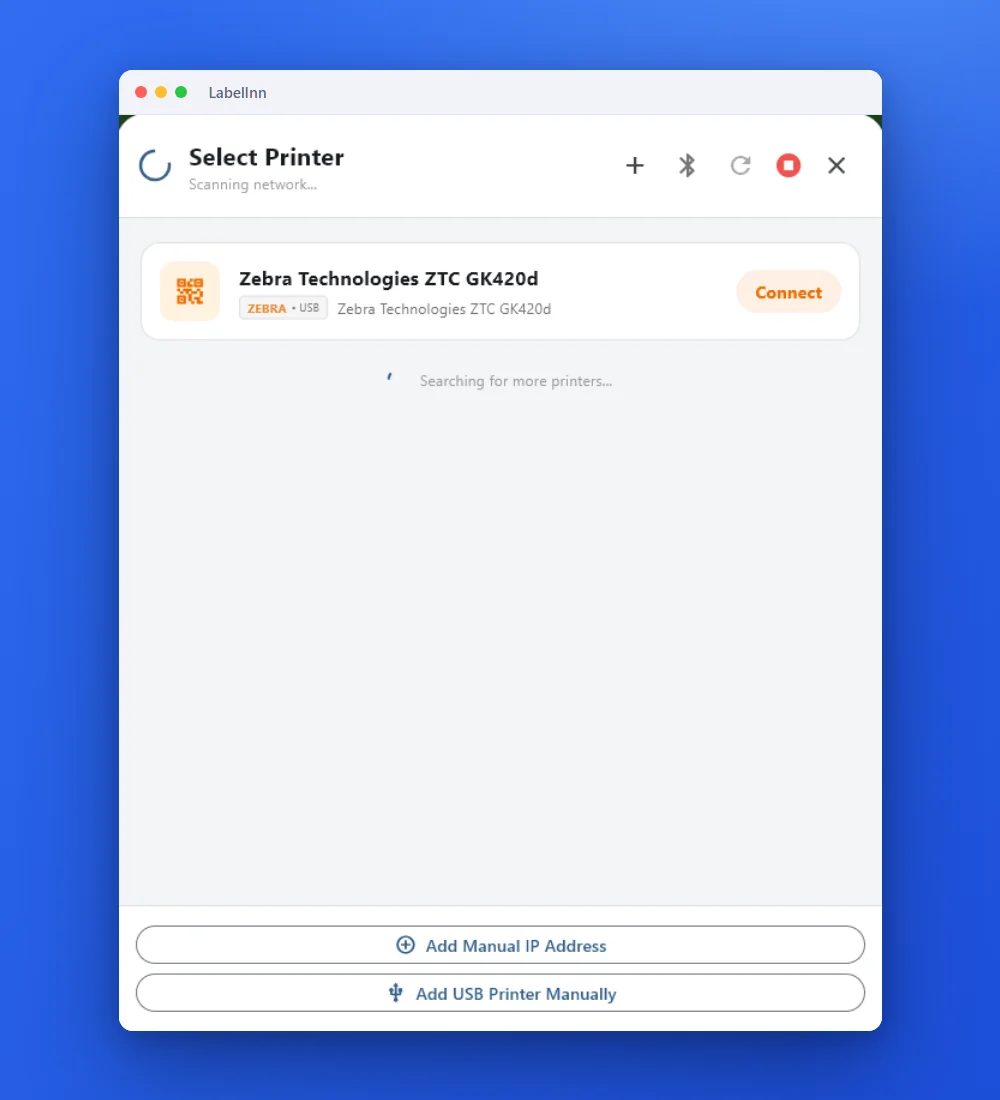
STEP 1
Find the printer
Install LabelInn on the PC the Zebra is plugged into. It lists printers on USB and the network.
DEVELOPERS / PYTHON / UPDATED 16 NOV 2026
Print ZPL from Python with a socket to port 9100 or the labelinn SDK. Code was run: str vs bytes, timeouts, job status, retries without double labels.
import socket

PRINTER = ("192.168.1.50", 9100)   # the printer's IP address and raw port

with open("label.zpl", "rb") as f:        # "rb": bytes, unchanged
    zpl = f.read()

with socket.create_connection(PRINTER, timeout=5) as s:
s.sendall(zpl)listener: 49 bytes, first 3 hex 5e5841 (^XA),
last 3 hex 5e585a (^XZ), sha256 same as label.zplfrom labelinn import LabelInn
client = LabelInn("sk_live_...")
client.print.create(printer_id="prt_abc123", payload_type="zpl",
payload_data=open("label.zpl").read())SHORT ANSWER
Zebra printers read ZPL from TCP port 9100, so a socket and sendall(zpl_bytes) is enough when your script can reach the printer. When it cannot (a cloud server, a USB printer, another site) or you want a job status, pip install labelinn and call client.print.create(...): the LabelInn app next to the printer delivers the job.
str and the timeout) are reproduced with their real error text.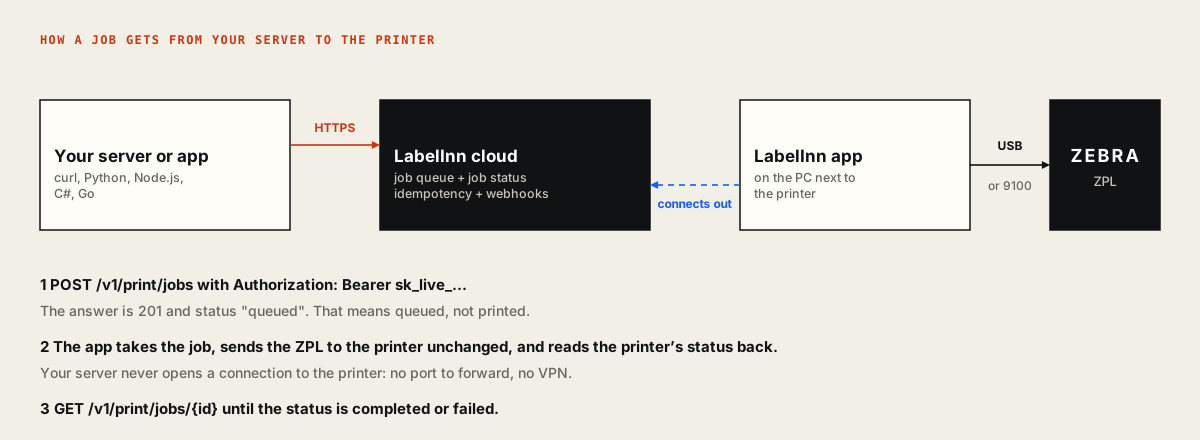
01 / DECISION
The socket is the shortest path; the SDK is the one that works across networks.
| Raw socket to port 9100 | LabelInn SDK | |
|---|---|---|
| Reaches | A network printer your script can open a TCP connection to | Any registered printer, USB or network, from any server with internet |
| Tells you it printed | No. Port 9100 accepts bytes whether or not the ribbon is out | A job status (queued to completed or failed) and webhooks |
| Printer off | The connection fails and the label is lost | The job waits and prints when the printer is back |
| Duplicates on retry | Yours to prevent | idempotency_key returns the first job instead of printing twice |
| Other printer brands | ZPL only | Send a design with data and it is converted to ZPL, TSPL, TPCL or ESC/Label for the printer |
| Cost | Nothing | Production API is on Pro ($24.90 a month); a test key and the sandbox are free |
02 / SOCKET
Open the file in binary mode so the bytes stay as they are.
import socket

PRINTER = ("192.168.1.50", 9100)   # the printer's IP address and raw port

with open("label.zpl", "rb") as f:        # "rb": bytes, unchanged
    zpl = f.read()

with socket.create_connection(PRINTER, timeout=5) as s:
    s.sendall(zpl)
sendall takes bytes. Read the file with "rb", or encode a string with zpl.encode("utf-8") and start the label with ^CI28 so the printer reads UTF-8. The byte for è is c3 a8 in UTF-8, e8 in cp1252 and 8a in cp850, so the encoding has to match what the printer expects.
$ python send-9100.py
listener: 49 bytes, first 3 hex 5e5841, last 3 hex 5e585a
sha256 of label.zpl and of what arrived:
0dbcaa09181b5083... identical>>> s.sendall("^XA^FO50,50^A0N,40,40^FDHello from LabelInn^FS^XZ")
TypeError: a bytes-like object is required, not 'str'
>>> socket.create_connection(("10.255.255.1", 9100), timeout=2)
TimeoutError: timed out (after 2.0 s)The listener on this page is a small TCP server, not a Zebra. Bytes arriving proves your code sent them; it does not prove a label came out. Always pass timeout: without it an unreachable printer blocks your script until the operating system gives up.
03 / SDK
Install with pip install labelinn (3.1.0, Python 3.8 or newer).
import time
from labelinn import LabelInn

client = LabelInn("sk_live_...")                    # Settings > API Keys

printer = next(p for p in client.fleet.list() if p["status"] == "online")

job = client.print.create(
    printer_id=printer["id"],
    payload_type="zpl",
    payload_data=open("label.zpl", encoding="utf-8").read(),
    idempotency_key="label-10492-1",                # same key = same job, no second label
)

while job["status"] not in ("completed", "failed", "cancelled"):
    time.sleep(2)
    job = client.print.get(job["id"])

print(job["id"], job["status"])
The printer id comes from client.fleet.list(). A 201 from the API means the job is queued, not printed, so the loop reads the job until it reaches a final state. The same key sent twice returns the same job.
GET  /v1/fleet/printers
User-Agent: labelinn-python/3.1.0
Authorization: Bearer sk_test_...

POST /v1/print/jobs
X-Idempotency-Key: label-10492-1
{"printer_id": "prt_abc123",
 "payload_type": "zpl",
 "payload_data": "^XA^FO50,50^A0N,40,40^FDHello from LabelInn^FS^XZ"}

GET  /v1/print/jobs/job_0001   (x3)

job_0001 completed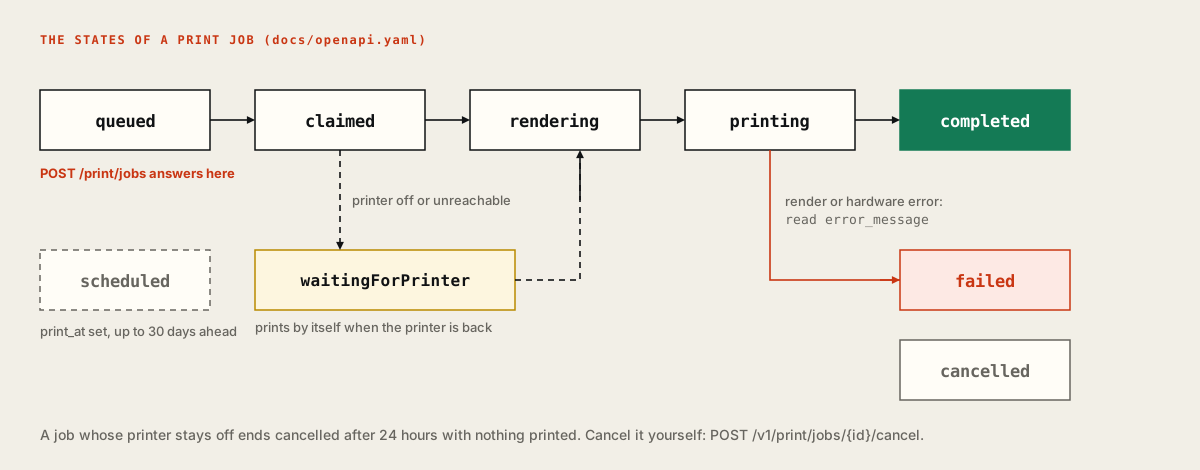
04 / TEMPLATE
Design the label once in LabelInn and send only the values; or batch up to 100 jobs.
from labelinn import LabelInn

client = LabelInn("sk_live_...")

# The design is made once in LabelInn; the code sends only the values.
job = client.print.create(
    printer_id="prt_abc123",
    payload_type="template",
    design_id="dsg_shipping",
    data={"order_id": "ORD-9876", "customer": "Maria Lopez", "barcode": "TR123456789"},
    copies=2,
    idempotency_key="order-ORD-9876-label",
)
print(job["id"], job["status"], job["copies"])
The label is drawn visually in LabelInn and bound to the field names; the app converts it to ZPL, TSPL or TPCL for whichever printer you pick. GET /v1/designs/{id}/variables lists the exact field names, so you never guess them.
from labelinn import LabelInn

client = LabelInn("sk_live_...")

result = client.print.batch([
    {"printer_id": "prt_abc123", "payload_type": "zpl",
     "payload_data": f"^XA^FO50,50^A0N,40,40^FD{sku}^FS^XZ"}
    for sku in ["A-1001", "A-1002", "A-1003"]
])
print(result["succeeded"], "of", result["total"], "accepted")job_0001 queued 2 (template.py)
3 of 3 accepted (batch.py)A batch is up to 100 jobs; each is accepted or refused on its own, so one bad row does not sink the rest.
05 / ERRORS
Retry a 429 after the wait the API sends; read everything else as an error.
import time
from labelinn import LabelInn
from labelinn.errors import LabelInnError, RateLimitError

client = LabelInn("sk_live_...")

def print_zpl(printer_id, zpl, key):
    for attempt in range(3):
        try:
            return client.print.create(printer_id=printer_id, payload_type="zpl",
                                       payload_data=zpl, idempotency_key=key)
        except RateLimitError as e:       # HTTP 429
            time.sleep(e.retry_after)     # seconds, sent by the API
    raise RuntimeError("still rate limited after 3 tries")

try:
    print_zpl("prt_abc123", "^XA^XZ", "label-1")
except LabelInnError as e:                # any other API error
print(e.status, e.code, e.message)unknown printer
404 PRINTER_NOT_FOUND Printer prt_missing not found
rate limited (429 BURST_RATE_LIMIT, retry_after_seconds 7)
sleep 7
sleep 7
sleep 7
RuntimeError: still rate limited after 3 triesThe limit counts requests, not labels: one batch call or one data array carries many labels. Production keys get 2,000 requests a day on Pro. A failed job needs a new idempotency key (add an attempt number) or the retry returns the failed job again.
06 / SETUP
The SDK talks to printers that the LabelInn app has registered.
STEP 1
Install LabelInn on the PC the Zebra is plugged into. It lists printers on USB and the network.
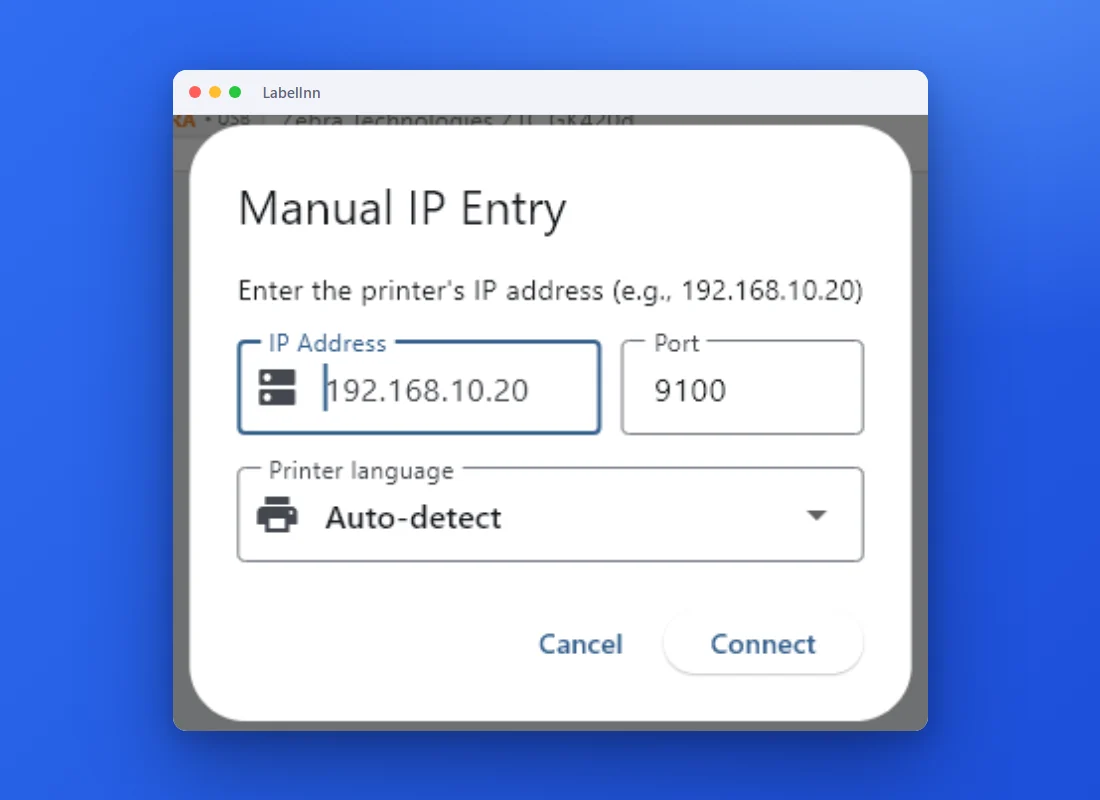
STEP 2
A network printer can be added by address. 9100 is the raw port.
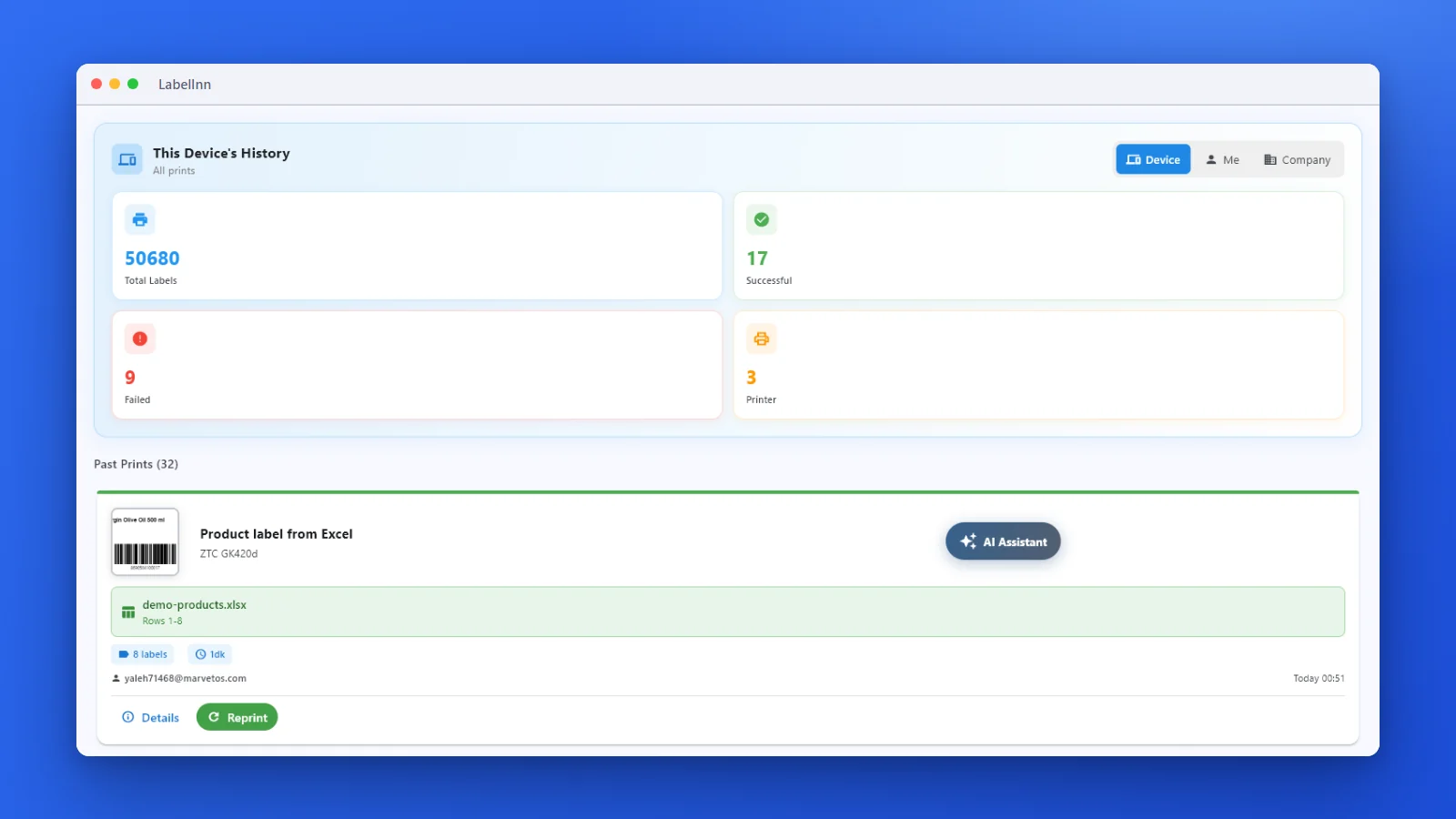
STEP 3
The history lists what printed and what failed, with a Reprint button.
07 / TESTED
Read this before you trust a snippet.
| Snippet | Run here? | Result |
|---|---|---|
| Socket to port 9100 | Run against a local listener | 49 bytes, SHA-256 identical to the file. |
| str in sendall, unreachable host | Run | TypeError: a bytes-like object is required, not 'str'; TimeoutError: timed out after 2.0 s. |
| SDK: print, poll, template, batch, errors | Run with labelinn 3.1.0 from PyPI (Python 3.12) | Against a local stand-in written from the API source. User-Agent labelinn-python/3.1.0, header X-Idempotency-Key, body as shown above. Not run against the live service. |
| A physical Zebra | Not used | No printer was connected. Nothing here claims a label came out of a specific model. |
08 / DECISION
The socket is free. The SDK needs a key, and only Pro keys print.
FREE
$0
sk_test_ key, read-only, 25 calls a day (it never prints)STARTER
$7.99 / month
PRO
$24.90 / month
sk_live_ keys that print, 2,000 calls a day, 60 a minuteA signed-in Free user can start a 14-day trial by hand from the dashboard banner or the app’s paywall (no card): it unlocks Excel and CSV binding, bulk barcodes and the production API. It does not start by itself at signup. Yearly billing is ten months for twelve ($79.90 Starter, $249.00 Pro). All plans and limits: pricing.
QUESTIONS / FAQ
On the same network, open a socket to the printer’s port 9100 and send the ZPL as bytes: socket.create_connection((host, 9100), timeout=5).sendall(zpl_bytes). From anywhere else, pip install labelinn, register the printer once in the LabelInn app, and call client.print.create(printer_id=..., payload_type="zpl", payload_data=zpl).
Sockets send bytes, not str. Open the file with "rb" or use zpl.encode("utf-8"), and start the label with ^CI28 if it has non-ASCII text.
Yes. The LabelInn app next to the printer connects out to LabelInn, so your server calls an HTTPS API and never needs network access to the printer.
Send idempotency_key. Repeating the call with the same key within 24 hours returns the original job instead of printing again. After a job comes back failed, use a new key, for example with an attempt counter.
labelinn.errors.RateLimitError, a subclass of LabelInnError, with retry_after in seconds. Other API errors raise LabelInnError with status, code and message.
Raw ZPL needs a printer that speaks ZPL. A design sent as a template is converted to the printer’s own language, including TSPL for TSC and TPCL for Toshiba.
Yes: a sk_test_ key and the sandbox never print and are free to use. A signed-in Free user can start a 14-day trial by hand from the dashboard banner or the app’s paywall (no card): it unlocks Excel and CSV binding, bulk barcodes and the production API. It does not start by itself at signup.
KEEP GOING
NEXT STEP / LABELINN
Download LabelInn, add the printer once, then call the SDK from any server. · Free plan, no card · pip install labelinn · USB, network, Bluetooth